Primefaces メッセージ、メッセージおよびグロウルコンポーネントの例

メッセージは通常、ユーザーへの通知、情報の提供、ユーザーが達成したアクションの認識を保つために使用されます。一般的に、メッセージは情報、エラー、警告などを表示するために使用されます。Primefacesは、すべてのjsf実装と同様に、これを行うために使用されるさまざまなタイプのコンポーネントを提供しています。メッセージ、メッセージ、およびグロウルは、この目的のために使用される唯一のコンポーネントです。このチュートリアルは、これらのコンポーネントをアプリケーションに組み込む手助けをします。
Primefaces メッセージ基本情報
メッセージは、標準のJSFメッセージコンポーネントのプレスキンされた拡張版です。
| タグ | メッセージ |
|---|---|
| コンポーネントクラス | org.primefaces.component.message.Message |
| コンポーネントタイプ | org.primefaces.component.Message |
| コンポーネントファミリー | org.primefaces.component |
| レンダラータイプ | org.primefaces.component.MessageRenderer |
| レンダラークラス | org.primefaces.component.message.MessageRenderer |
プライムフェイス メッセージ属性
| 名前 | デフォルト | タイプ | 説明 |
|---|---|---|---|
| 識別子 | 無 | String | コンポーネントの一意の識別子。 |
| レンダリングされた | 本当です | ブーリアン | コンポーネントのレンダリングを指定するためのブール値。falseに設定された場合、コンポーネントはレンダリングされません。 |
| バインディング | 無 | 物体 | バックイングビーにあるサーバーサイドのUIコンポーネントインスタンスにマッピングされるel式。 |
| 要約を表示する | 偽 | ブーリアン | FacesMessageの要約を表示するかどうかを指定します。 |
| 詳細を表示する | 本当 | ブーリアン | FacesMessageの詳細を表示するかどうかを指定します。 |
| のために | 無 | String | 表示するメッセージのコンポーネントのID。 |
| 再表示する | 本当 | ブーリアン | 既にレンダリングされたメッセージを表示するかどうかを定義します。 |
| 表示する | 両方 | String | 表示モードを定義します。 |
| 逃げる | 本当です | ブーリアン | HTMLがエスケープされるかどうかを定義します。 |
| 深刻度 | 無 | String | 表示するための深刻度のカンマ区切りリストのみ。 |
| スタイル | 無 | String | コンポーネントのインラインスタイル。 |
| スタイルクラス | 無 | String | コンポーネントのスタイルクラス。 |
Primefacesメッセージの始め方
一般的に、アプリケーションにメッセージを追加するには、FacesMessage インスタンスを自分のFacesContext インスタンスに追加し、その後RenderResponse フェーズでレンダーされる必要があります。これらのメッセージの多くは手動で追加され、同時に他のメッセージは jsf 実装によって追加されます。検証と変換を扱う際には、実際にはあなたのコードの一部でない多くのメッセージが表示されます。以下の例は、必要な入力を入力せずにフォームを送信するときに表示されるエラーメッセージを生成する検証プロセスのシンプルな例を示しています。index.xhtml
<html xmlns="https://www.w3.org/1999/xhtml"
	xmlns:ui="https://java.sun.com/jsf/facelets"
	xmlns:h="https://java.sun.com/jsf/html"
	xmlns:f="https://java.sun.com/jsf/core"
	xmlns:p="https://primefaces.org/ui">
<h:head>
	<script name="jquery/jquery.js" library="primefaces"></script>
</h:head>
<h:form id="form">
	<p:outputPanel>
		<p:outputLabel value="Typing of your message is mandatory:"></p:outputLabel>
	</p:outputPanel>
	<h:inputText id="input" value="#{messageManagedBean.message}" required="true"/>
	<p:message id="message" for="input"></p:message>
	<p:commandButton value="Execute JSF Lifecycle - Invoke Action" action="#{messageManagedBean.doSomeAction}" update="input message"></p:commandButton>
</h:form>
</html>
MessageManagedBean.javapackage com.journaldev;
import javax.faces.bean.ManagedBean;
import javax.faces.bean.SessionScoped;
@ManagedBean
@SessionScoped
public class MessageManagedBean {
private String message;
public String getMessage() {
return message;
}
public void setMessage(String message) {
this.message = message;
}
public String doSomeAction(){
return "";
}
}


上記のコードについての詳細な説明は以下の通りです。
- レンダリングされたメッセージはあなたのコードの一部ではなく、ProcessValidationフェーズの実行を通じてjsf実装によってキューに入れられています。
- RenderResponseフェーズは、メッセージを表示する役割を担っています。
- メッセージキューは、jsfライフサイクルを通過する必要があります。jsfライフサイクルの通常の開始は、アクションを有効にすることによって行われます。
- 特定の入力が必須であることを保証するために、required 属性を true に設定する必要があります。ProcessValidation は、必須のコンポーネントを確認し、いくつかが抜け落ちた場合にはメッセージをキューに入れます。
- メッセージコンポーネントは、主に特定のコンポーネントをメッセージに関連付けるために使用されます。通常、このメッセージは関連するコンポーネントに伴うすべてのメッセージを表示するために常に使用されます。
- メッセージとその関連コンポーネントとの関連は、for 属性を提供することによって達成されます。
Primefaces メッセージ表示モード
メッセージコンポーネントには、3つの異なる表示モードがあります:
- テキスト: メッセージテキストのみが表示されます。
- アイコン: メッセージの重大度のみが表示され、メッセージテキストはツールチップとして表示されます。
- 両方(デフォルト): アイコンとテキストの両方が表示されます。
以前に紹介した同じ例を変更して、使用する表示モードを制御しましょう。 index.xhtml
<html xmlns="https://www.w3.org/1999/xhtml"
	xmlns:ui="https://java.sun.com/jsf/facelets"
	xmlns:h="https://java.sun.com/jsf/html"
	xmlns:f="https://java.sun.com/jsf/core"
	xmlns:p="https://primefaces.org/ui">
<h:head>
	<script name="jquery/jquery.js" library="primefaces"></script>
</h:head>
<h:form id="form">
	<p:outputPanel>
		<p:outputLabel value="Typing of your message is mandatory:"></p:outputLabel>
	</p:outputPanel>
	<h:inputText id="input" value="#{messageManagedBean.message}" required="true"/>
	<p:message id="message" for="input" display="icon"></p:message>
	<p:commandButton value="Execute JSF Lifecycle - Invoke Action" action="#{messageManagedBean.doSomeAction}" update="input message"></p:commandButton>
</h:form>
</html>


Primefaces メッセージ基本情報
メッセージは、標準のJSFメッセージコンポーネントのプレスキンされた拡張版です。
| タグ | メッセージ |
|---|---|
| コンポーネントクラス | org.primefaces.component.messages.Messages |
| コンポーネントタイプ | org.primefaces.component.Messages |
| コンポーネントファミリー | org.primefaces.component |
| レンダラータイプ | org.primefaces.component.MessagesRenderer |
| レンダラークラス | org.primefaces.component.messages.MessagesRenderer |
プライムフェイス メッセージ属性
| 名前 | デフォルト | タイプ | 説明 |
|---|---|---|---|
| 識別子 | 無 | String | コンポーネントの一意の識別子。 |
| レンダリングされた | 本当 | ブーリアン | コンポーネントのレンダリングを指定するためのブール値。falseに設定された場合、コンポーネントはレンダリングされません。 |
| バインディング | 無 | 物体 | バックイングビーにあるサーバーサイドのUIコンポーネントインスタンスにマッピングされるel式。 |
| 要約を表示する | 本当 | ブーリアン | FacesMessagesの要約を表示するかどうかを指定します。 |
| 詳細を表示する | 偽 | ブーリアン | FacesMessagesの詳細を表示するかどうかを指定します。 |
| グローバルのみ | 偽 | String | 真の場合、clientIdがない顔のメッセージのみが表示されます。 |
| 再表示する | 本当 | ブーリアン | 既にレンダリングされたメッセージを表示するかどうかを定義します。 |
| 自動更新 | 偽 | ブーリアン | 真に設定されている場合、自動更新モードを有効にします。 |
| のために | 無 | String | 関連するキーの名前。globalOnlyと一緒に使用されると優先されます。 |
| 逃げる | 本当です | ブーリアン | HTMLがエスケープされるかどうかを定義します。 |
| 深刻度 | 無 | String | 表示するための深刻度のカンマ区切りリストのみ。 |
| 閉じることができる | 偽 | ブーリアン | メッセージを非表示にするための閉じるアイコンを追加します。 |
| スタイル | 無 | String | コンポーネントのインラインスタイル。 |
| スタイルクラス | 無 | String | コンポーネントのスタイルクラス。 |
| アイコンを表示する | 本当 | ブーリアン | 重大度アイコンが表示されるかどうかを定義します。 |
Primefacesメッセージの始め方
p:messagesを使用する際は、このコンポーネントがページ内の特定のコントロールに属しない一般的なメッセージを表示するために使用されることを知っておくことが重要です。以下のサンプルは、一般的なメッセージを表示するためにp:messagesをどのように使用できるかを示しています。index2.xhtml
<html xmlns="https://www.w3.org/1999/xhtml"
	xmlns:ui="https://java.sun.com/jsf/facelets"
	xmlns:h="https://java.sun.com/jsf/html"
	xmlns:f="https://java.sun.com/jsf/core"
	xmlns:p="https://primefaces.org/ui">
<h:head>
	<script name="jquery/jquery.js" library="primefaces"></script>
</h:head>
<h:form id="form">
	<p:messages id="messages"/>
	<p:outputPanel>
		<p:outputLabel value="Typing of your preferred technical site"></p:outputLabel>
	</p:outputPanel>
	<h:inputText id="input" value="#{messageManagedBean.message}"/>
	<p:commandButton value="Execute JSF Lifecycle - Invoke Action"
			action="#{messageManagedBean.doSomeAction}" update="messages"></p:commandButton>
</h:form>
</html>
MessageManagedBean.javapackage com.journaldev;
import javax.faces.application.FacesMessage;
import javax.faces.bean.ManagedBean;
import javax.faces.bean.SessionScoped;
import javax.faces.context.FacesContext;
@ManagedBean
@SessionScoped
public class MessageManagedBean {
private String message ="";
public String getMessage() {
return message;
}
public void setMessage(String message) {
this.message = message;
}
public String doSomeAction(){
if(this.message.equals("")){
FacesContext.getCurrentInstance().addMessage(null,
new FacesMessage(FacesMessage.SEVERITY_ERROR, "Empty value isn't accepted","Empty value isn't accepted"));
}
else if(this.message.equals("") == false){
FacesContext.getCurrentInstance().addMessage(null,
new FacesMessage(FacesMessage.SEVERITY_ERROR, "You entered value","You entered value"));
}
return "";
}
}

これまでに何が起こったのかについての詳細な説明です:
- 一般的なメッセージカバーに主に使用されるメッセージコンポーネント。
- メッセージを追加するには、メッセージの重大性、メッセージの詳細セクション、およびメッセージの要約セクションで構成されたFacesMessageのインスタンスを作成します。メッセージの作成が完了したら、それをFacesContextに追加して表示する必要があります。RenderResponseは、それをページに表示します。
深刻度レベル
前の例では、エラーの重大度を持つ2つのメッセージがページにレンダリングされる例を示しました。p:messagesコンポーネントがどのタイプのメッセージを表示するかを制御できることが重要です。severity属性をカンマ区切りのinfo, warn, error, fatal値で提供することで、表示されるメッセージを制御できます。index3.xhtml
<html xmlns="https://www.w3.org/1999/xhtml"
	xmlns:ui="https://java.sun.com/jsf/facelets"
	xmlns:h="https://java.sun.com/jsf/html"
	xmlns:f="https://java.sun.com/jsf/core"
	xmlns:p="https://primefaces.org/ui">
<h:head>
	<script name="jquery/jquery.js" library="primefaces"></script>
</h:head>
<h:form id="form">
	<p:messages id="messages" severity="fatal,info,warn"/>
	<p:outputPanel>
		<p:outputLabel value="Typing of your preferred technical site"></p:outputLabel>
	</p:outputPanel>
	<h:inputText id="input" value="#{messageManagedBean.message}"/>
	<p:commandButton value="Execute JSF Lifecycle - Invoke Action"
			action="#{messageManagedBean.doSomeAction}" update="messages"></p:commandButton>
</h:form>
</html>
MessageManagedBean.javapackage com.journaldev;
import javax.faces.application.FacesMessage;
import javax.faces.bean.ManagedBean;
import javax.faces.bean.SessionScoped;
import javax.faces.context.FacesContext;
@ManagedBean
@SessionScoped
public class MessageManagedBean {
private String message ="";
public String getMessage() {
return message;
}
public void setMessage(String message) {
this.message = message;
}
public String doSomeAction(){
if(this.message.equals("")){
FacesContext.getCurrentInstance().addMessage(null,
new FacesMessage(FacesMessage.SEVERITY_ERROR, "Error Message","Error Message"));
FacesContext.getCurrentInstance().addMessage(null,
new FacesMessage(FacesMessage.SEVERITY_FATAL, "Fatal Message","Fatal Message"));
FacesContext.getCurrentInstance().addMessage(null,
new FacesMessage(FacesMessage.SEVERITY_WARN, "WARN Message","WARN Message"));
FacesContext.getCurrentInstance().addMessage(null,
new FacesMessage(FacesMessage.SEVERITY_INFO, "INFO Message","INFO Message"));
}
return "";
}
}

AutoUpdate
以前に提供されたすべての例を探ると、p:commandButtonがメッセージコンポーネントを非同期に更新していることに気付くはずです。そのような配置を避けることができ、特に階層的な構造を持つページに対しては特に重要です。一般的なメッセージを表示するために使用されるメッセージコンポーネントを含むテンプレートページを考えてみましょう。index4.xhtml
<html xmlns="https://www.w3.org/1999/xhtml"
	xmlns:ui="https://java.sun.com/jsf/facelets"
	xmlns:h="https://java.sun.com/jsf/html"
	xmlns:f="https://java.sun.com/jsf/core"
	xmlns:p="https://primefaces.org/ui">
<h:head>
	<script name="jquery/jquery.js" library="primefaces"></script>
</h:head>
<h:form id="form">
	<p:messages id="messages" autoUpdate="true"/>
	<p:outputPanel>
		<p:outputLabel value="Typing of your preferred technical site"></p:outputLabel>
	</p:outputPanel>
	<h:inputText id="input" value="#{messageManagedBean.message}"/>
	<p:commandButton value="Execute JSF Lifecycle - Invoke Action"
			action="#{messageManagedBean.doSomeAction}"></p:commandButton>
</h:form>
</html>
MessageManagedBean.javapackage com.journaldev;
import javax.faces.application.FacesMessage;
import javax.faces.bean.ManagedBean;
import javax.faces.bean.SessionScoped;
import javax.faces.context.FacesContext;
@ManagedBean
@SessionScoped
public class MessageManagedBean {
private String message ="";
public String getMessage() {
return message;
}
public void setMessage(String message) {
this.message = message;
}
public String doSomeAction(){
if(this.message.equals("")){
FacesContext.getCurrentInstance().addMessage(null,
new FacesMessage(FacesMessage.SEVERITY_ERROR, "Error Message","Error Message"));
}
return "";
}
}

- 開発されたコマンドアクションはupdate属性を提供していません。更新属性が存在しないにもかかわらず、メッセージが表示されたのは、autoUpdateがメッセージコンポーネント自体によって使用されているためです。
ターゲット可能なメッセージ
メッセージの表示は、特定のメッセージコンポーネントを使用して制御できます。異なる2つのメッセージコンポーネント {AとB} と、異なる2つの入力コンポーネント {1と2} を使用しましょう。入力番号1の場合、メッセージAに対してメッセージが表示され、入力番号2の場合、メッセージBが使用されます。以下の例は、その使用法の影響を示しています。index5.xhtml
<html xmlns="https://www.w3.org/1999/xhtml"
	xmlns:ui="https://java.sun.com/jsf/facelets"
	xmlns:h="https://java.sun.com/jsf/html"
	xmlns:f="https://java.sun.com/jsf/core"
	xmlns:p="https://primefaces.org/ui">
<h:head>
	<script name="jquery/jquery.js" library="primefaces"></script>
</h:head>
<h:form id="form">
	<p:messages for="input1" id="messagesA"/>
	<p:messages for="input2" id="messagesB"/>
	<p:outputPanel>
		<p:outputLabel value="Typing of your preferred technical site"></p:outputLabel>
	</p:outputPanel>
	<h:inputText id="input1" value="#{messageManagedBean.message}"/>
	<h:inputText id="input2" value="#{messageManagedBean.message}"/>
	<p:commandButton value="Execute JSF Lifecycle - Invoke Action One"
			action="#{messageManagedBean.doSomeActionOne}" update="messagesA messagesB"></p:commandButton>
	<p:commandButton value="Execute JSF Lifecycle - Invoke Action Two"
			action="#{messageManagedBean.doSomeActionTwo}" update="messagesA messagesB"></p:commandButton>
</h:form>
</html>
MessageManagedBean.javapackage com.journaldev;
import javax.faces.application.FacesMessage;
import javax.faces.bean.ManagedBean;
import javax.faces.bean.SessionScoped;
import javax.faces.context.FacesContext;
@ManagedBean
@SessionScoped
public class MessageManagedBean {
private String message ="";
public String getMessage() {
return message;
}
public void setMessage(String message) {
this.message = message;
}
public String doSomeActionOne(){
if(this.message.equals("")){
FacesContext.getCurrentInstance().addMessage("form:input1",
new FacesMessage(FacesMessage.SEVERITY_ERROR, "Error Message For Input1","Error Message For Input1"));
}
return "";
}
public String doSomeActionTwo(){
if(this.message.equals("")){
FacesContext.getCurrentInstance().addMessage("form:input2",
new FacesMessage(FacesMessage.SEVERITY_ERROR, "Error Message For Input2","Error Message For Input2"));
}
return "";
}
}


- ターゲットメッセージを特集するには、メッセージコンポーネントをfor属性を使用してコンポーネントに関連付け、FacesContextに追加されたすべてのメッセージのためにclientIdを提供する必要があります。
jsfの実装は、コンポーネントに一意の識別子を割り当てていることに注意してください。これらの識別子はFormId:componentIdの形式を取ります。この識別を無効にするには、formコンポーネントに対してprependIdをfalseに設定します。これにより、すべてのコンポーネントは実際にはそのcomponentIdのみを使用して識別されます。識別されていないものについては、j_id4のようなランダムな識別を使用して識別されます。
プライムフェイシズ グロウル 基本情報
GrowlはMacのGrowl通知ウィジェットに基づいており、オーバーレイにFacesMessagesを表示するために使用され、メッセージおよびメッセージコンポーネントと同様です。
| タグ | うなる |
|---|---|
| コンポーネントクラス | org.primefaces.component.growl.Growl |
| コンポーネントタイプ | org.primefaces.component.Growl |
| コンポーネントファミリー | org.primefaces.component |
| レンダータイプ | org.primefaces.component.GrowlRenderer |
| レンダラークラス | org.primefaces.component.growl.GrowlRenderer |
Primefaces グロウル属性
| 名前 | デフォルト | タイプ | 説明 |
|---|---|---|---|
| 識別子 | 無 | String | コンポーネントのユニーク識別子 |
| 描画された | 本当です | ブーリアン | コンポーネントのレンダリングを指定するためのブール値。falseに設定された場合、コンポーネントはレンダリングされません。 |
| バインディング | 無効なソースです。 | 物体 | バックエンド bean の UIComponent インスタンスにマッピングされる el 表現 |
| 粘着性 | 偽 | ブーリアン | メッセージが自動的に隠されるのではなく、表示されたままにするかどうかを指定します。 |
| 要約を表示する | 本当 | ブーリアン | メッセージの要約を表示するかどうかを指定します。 |
| 詳細を表示する | 偽 | ブーリアン | メッセージの詳細を表示するかどうかを指定します。 |
| グローバルのみ | 偽 | ブーリアン | 真の場合、クライアントIDのない顔メッセージのみが表示されます。 |
| 人生 | 6000 | 整数 | 非粘着メッセージを表示するためのミリ秒単位の期間。 |
| 自動更新 | 偽 | ブーリアン | 自動更新モードを指定します。 |
| 再表示する | 本当 | ブーリアン | すでに表示されたメッセージを表示するかどうかを定義します。 |
| のために | 無 | String | 関連するキーの名前。globalOnlyと一緒に使用されると優先されます。 |
| 逃げる | 本当です | ブーリアン | HTMLがエスケープされるかどうかを定義します。 |
| 深刻度 | 無 | String | 表示するための深刻度のカンマ区切りリストのみ。 |
Primefaces Growlの始め方
Growlはこれまでに議論されたメッセージコンポーネントと大きく異なることはないので、ターゲティング可能なメッセージと重要度レベルオプションを提供するためにそれらを頼りにすることができます。次の例は、Growlコンポーネントに関して得られる最もシンプルな例を示しています。index6.xhtml
<html xmlns="https://www.w3.org/1999/xhtml"
	xmlns:ui="https://java.sun.com/jsf/facelets"
	xmlns:h="https://java.sun.com/jsf/html"
	xmlns:f="https://java.sun.com/jsf/core"
	xmlns:p="https://primefaces.org/ui">
<h:head>
	<script name="jquery/jquery.js" library="primefaces"></script>
</h:head>
<h:form id="form">
	<p:growl id="message"/>
	<p:outputPanel>
		<p:outputLabel value="Typing of your preferred technical site"></p:outputLabel>
	</p:outputPanel>
	<h:inputText id="input" value="#{messageManagedBean.message}"/>
	<p:commandButton value="Execute JSF Lifecycle - Invoke Action One"
			action="#{messageManagedBean.doSomeAction}" update="message"></p:commandButton>
</h:form>
</html>
MessageManagedBean.javapackage com.journaldev;
import javax.faces.application.FacesMessage;
import javax.faces.bean.ManagedBean;
import javax.faces.bean.SessionScoped;
import javax.faces.context.FacesContext;
@ManagedBean
@SessionScoped
public class MessageManagedBean {
private String message ="";
public String getMessage() {
return message;
}
public void setMessage(String message) {
this.message = message;
}
public String doSomeAction(){
if(this.message.equals("")){
FacesContext.getCurrentInstance().addMessage(null,
new FacesMessage(FacesMessage.SEVERITY_ERROR, "Error Message Displayed Growl","Error Message Displayed Growl"));
}
return "";
}
}

Primefacesメッセージのライフタイム
各メッセージは6000ミリ秒表示された後に非表示になりますので、Growlメッセージをスティッキーに設定することができます。これは、メッセージが自動的に非表示にならないことを意味します。index7.xhtml
<html xmlns="https://www.w3.org/1999/xhtml"
	xmlns:ui="https://java.sun.com/jsf/facelets"
	xmlns:h="https://java.sun.com/jsf/html"
	xmlns:f="https://java.sun.com/jsf/core"
	xmlns:p="https://primefaces.org/ui">
<h:head>
	<script name="jquery/jquery.js" library="primefaces"></script>
</h:head>
<h:form id="form">
	<p:growl id="message" sticky="true"/>
	<p:outputPanel>
		<p:outputLabel value="Typing of your preferred technical site"></p:outputLabel>
	</p:outputPanel>
	<h:inputText id="input" value="#{messageManagedBean.message}"/>
	<p:commandButton value="Execute JSF Lifecycle - Invoke Action One"
			action="#{messageManagedBean.doSomeAction}" update="message"></p:commandButton>
</h:form>
</html>
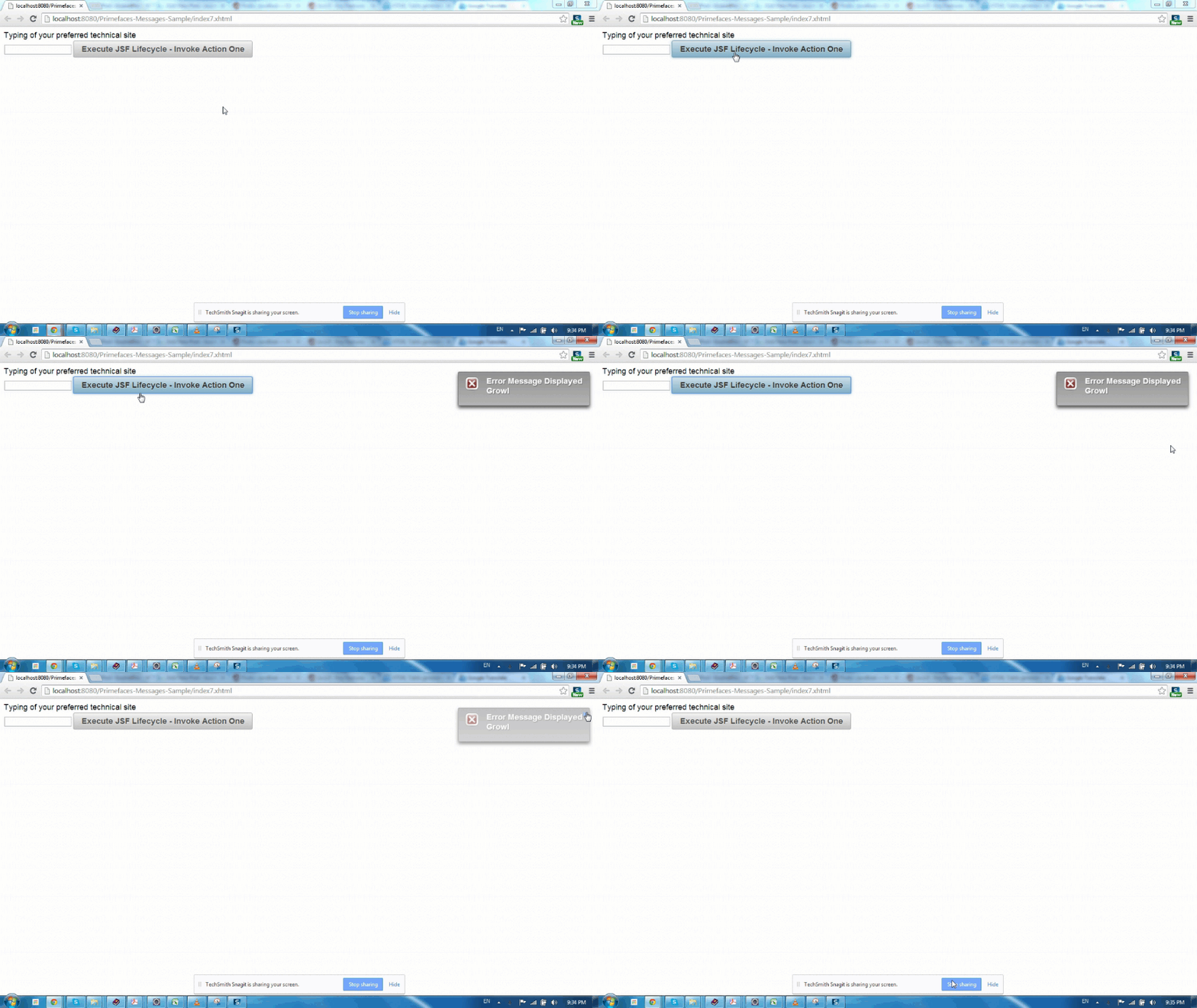
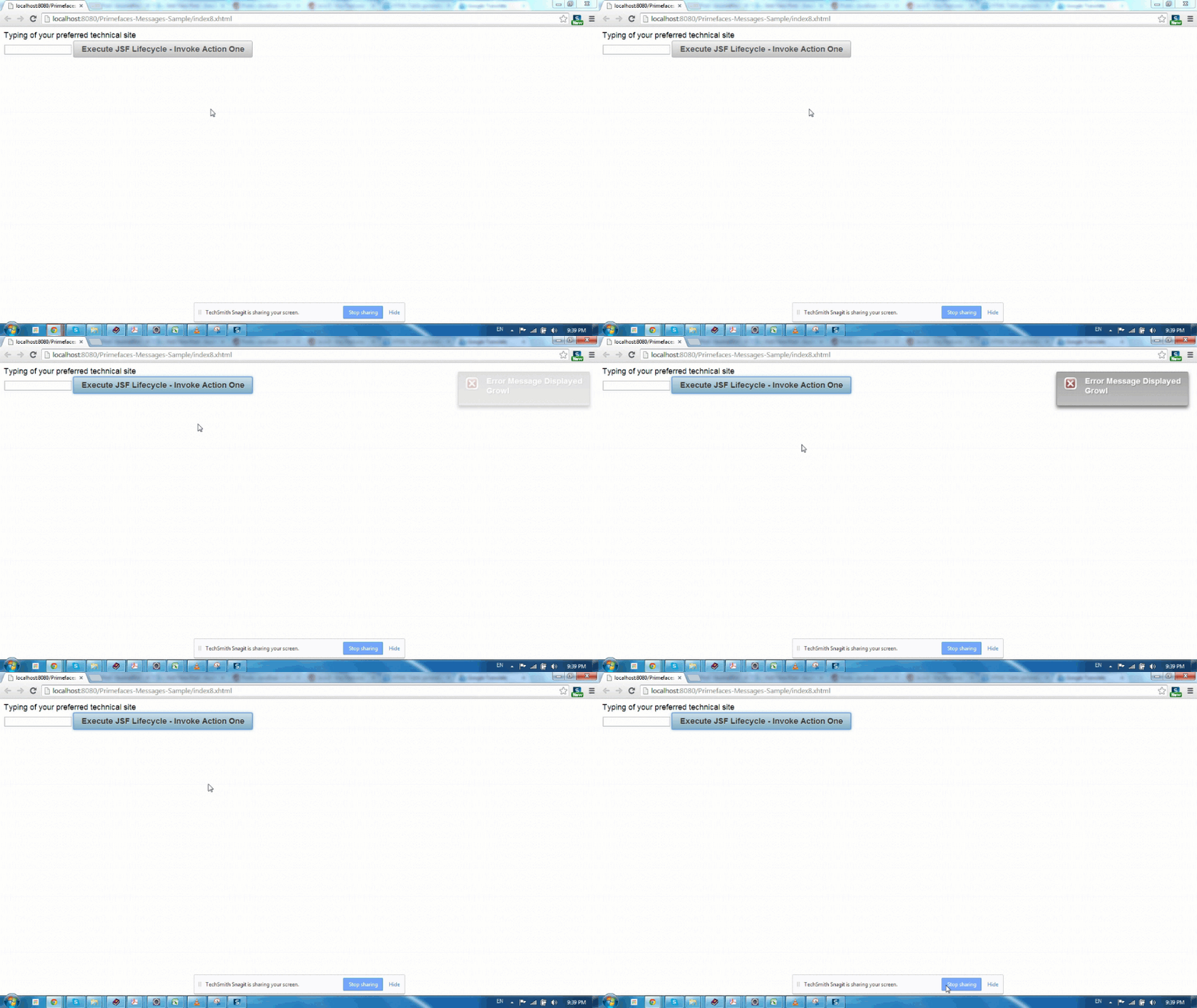
もし、Growlメッセージを粘着的に表示したくないのであれば、life属性を調整することで、メッセージの表示時間を制御することもできます。 index8.xhtml
<html xmlns="https://www.w3.org/1999/xhtml"
	xmlns:ui="https://java.sun.com/jsf/facelets"
	xmlns:h="https://java.sun.com/jsf/html"
	xmlns:f="https://java.sun.com/jsf/core"
	xmlns:p="https://primefaces.org/ui">
<h:head>
	<script name="jquery/jquery.js" library="primefaces"></script>
</h:head>
<h:form id="form">
	<p:growl id="message" life="2000"/>
	<p:outputPanel>
		<p:outputLabel value="Typing of your preferred technical site"></p:outputLabel>
	</p:outputPanel>
	<h:inputText id="input" value="#{messageManagedBean.message}"/>
	<p:commandButton value="Execute JSF Lifecycle - Invoke Action One"
			action="#{messageManagedBean.doSomeAction}" update="message"></p:commandButton>
</h:form>
</html>
Primefacesグロウルメッセージの位置付け
Growlメッセージの表示位置を制御することもできます。デフォルトではGrowlは右上隅に配置されており、位置はui-growlというCSSセレクタで制御できます。index9.xhtml
<html xmlns="https://www.w3.org/1999/xhtml"
	xmlns:ui="https://java.sun.com/jsf/facelets"
	xmlns:h="https://java.sun.com/jsf/html"
	xmlns:f="https://java.sun.com/jsf/core"
	xmlns:p="https://primefaces.org/ui">
<h:head>
	<script name="jquery/jquery.js" library="primefaces"></script>
	<style>
		.ui-growl {
			left:700px;
		}
	</style>
</h:head>
<h:form id="form">
	<p:growl id="message"/>
	<p:outputPanel>
		<p:outputLabel value="Typing of your preferred technical site"></p:outputLabel>
	</p:outputPanel>
	<h:inputText id="input" value="#{messageManagedBean.message}"/>
	<p:commandButton value="Execute JSF Lifecycle - Invoke Action One"
			action="#{messageManagedBean.doSomeAction}" update="message"></p:commandButton>
</h:form>
</html>

逃げる
Primefaces のメッセージコンポーネント(メッセージ、メッセージズ、グロール)は、すべての HTML コンテンツをエスケープするようにデフォルト設定されています。Primefaces のメッセージコンポーネントを介して HTML を表示する必要がある場合は、エスケープを false に設定してください。index10.xhtml
<html xmlns="https://www.w3.org/1999/xhtml"
	xmlns:ui="https://java.sun.com/jsf/facelets"
	xmlns:h="https://java.sun.com/jsf/html"
	xmlns:f="https://java.sun.com/jsf/core"
	xmlns:p="https://primefaces.org/ui">
<h:head>
	<script name="jquery/jquery.js" library="primefaces"></script>
</h:head>
<h:form id="form">
	<p:messages id="message" escape="false"/>
	<p:outputPanel>
		<p:outputLabel value="Typing of your preferred technical site"></p:outputLabel>
	</p:outputPanel>
	<h:inputText id="input" value="#{messageManagedBean.message}"/>
	<p:commandButton value="Execute JSF Lifecycle - Invoke Action One"
			action="#{messageManagedBean.doSomeAction}" update="message"></p:commandButton>
</h:form>
</html>
MessageManagedBean.javapackage com.journaldev;
import javax.faces.application.FacesMessage;
import javax.faces.bean.ManagedBean;
import javax.faces.bean.SessionScoped;
import javax.faces.context.FacesContext;
@ManagedBean
@SessionScoped
public class MessageManagedBean {
private String message ="";
public String getMessage() {
return message;
}
public void setMessage(String message) {
this.message = message;
}
public String doSomeAction(){
if(this.message.equals("")){
FacesContext.getCurrentInstance().addMessage(null,
new FacesMessage(FacesMessage.SEVERITY_ERROR, "<i>Error Message Displayed</i>","<i>Error Message Displayed</i>"));
}
return "";
}
}

詳細と要約メッセージ部分
メッセージの一部の表示を制御できるため、表示するメッセージの部分を選択できます。すべてのFacesMessageには、メッセージがFacesContextに追加されると提供される要約部分と詳細部分が含まれています。

<html xmlns="https://www.w3.org/1999/xhtml"
	xmlns:ui="https://java.sun.com/jsf/facelets"
	xmlns:h="https://java.sun.com/jsf/html"
	xmlns:f="https://java.sun.com/jsf/core"
	xmlns:p="https://primefaces.org/ui">
<h:head>
	<script name="jquery/jquery.js" library="primefaces"></script>
</h:head>
<h:form id="form">
	<p:messages id="message" showDetail="true" showSummary="true" escape="false"/>
	<p:outputPanel>
		<p:outputLabel value="Typing of your preferred technical site"></p:outputLabel>
	</p:outputPanel>
	<h:inputText id="input" value="#{messageManagedBean.message}"/>
	<p:commandButton value="Execute JSF Lifecycle - Invoke Action One"
			action="#{messageManagedBean.doSomeAction}" update="message"></p:commandButton>
</h:form>
</html>

プライムフェイス メッセージ グロウル サマリー
メッセージは、公開される幅広いアプリケーション内で多く使用されています。Primefacesは、アプリケーション内で情報提供、通知、情報テキストの表示に使用できるこれらのコンポーネントを大規模に提供します。下にコメントして私たちに貢献し、ソースコードを見つけてください。
PrimeFacesメッセージプロジェクトをダウンロード