PHP MySQLによるAndroidログインと登録

Androidのログインと登録は非常に一般的なシナリオです。ユーザー情報を必要とするすべてのアプリで、登録およびログインの操作が見られます。このチュートリアルでは、ローカルWebサーバーとMySQLデータベースを設定します。Androidのログインおよび登録アプリケーションを開発します。MySQLデータベースに接続するためにPHPスクリプトを使用します。
Androidログイン登録
最初のステップはバックエンドのウェブサーバーを作成することです。私はMac OS Xで作業しており、XAMPPを使用するとローカルのApacheウェブサーバーとMySQLデータベースを迅速に設定できます。
XAMPPサーバーの設定
XAMPP(またはWAMP)は、PHP、MySQLのウェブアプリケーションを開発するための環境を作成するワンクリックインストーラーソフトウェアです(私たちのAndroidアプリケーションと接続します)。ここからXAMPPをダウンロードしてインストールしてください。インストール後にXAMPPアプリを起動すると、以下の画面が表示されます。


<?php
echo "Hello, World";
?>
上記のコードでは、
- ?php は、任意のPHPスクリプトの開始タグです。
- ?> は、Javaの閉じ括弧のような閉じタグを意味します。
注意:このチュートリアルではPHPの知識は必須ではありません。MACを使用している場合は、アプリケーションに移動して、Xamppのhtdocsフォルダーに行きます。ここにtest_androidという新しいフォルダーを作成して、以前に作成したtest.phpをコピー&ペーストします。次に、URL https://localhost/test_android/test.phpを開きます。次のような画面が表示されるでしょう:

MySQLデータベースの設定
phpMyAdminを開くには、https://localhost/phpmyadminを訪問してください。次に、ヘッダー行の左上にあるデータベースタブを選択します。ランダムな名前を付けて作成します。新しく作成された空のデータベースは、左のサイドバーに表示されます。

CREATE TABLE  `firstDB`.`users` (
    `id` INT NOT NULL AUTO_INCREMENT PRIMARY KEY ,
    `username` VARCHAR( 20 ) NOT NULL ,
    `password` VARCHAR( 20 ) NOT NULL
)
テーブルが正常に作成されると、次のような画面が表示されます:

PHPをMySQLデータベースに接続する
PHPスクリプトをMySQLデータベースに接続するには、3つの入力値が必要です。以下は、XAMPPサーバーの入力とそのデフォルト値です。
- ホスト名: localhost
- MySQLのユーザー名 : root
- MySQLのパスワード:空白です。
テスト用の test-connect.php スクリプトを作成し、htdocs->test-android フォルダーに追加しましょう。
<?php
$host="localhost";
$user="root";
$password="";
$con=mysql_connect($host,$user,$password);
if($con) {
    echo '<h1>Connected to MySQL</h1>';
} else {
    echo '<h1>MySQL Server is not connected</h1>';
}
?>
mysql_connect() は、上記のパラメータを使用してMySQLデータベースに接続するためのPHPの組み込み関数です。https://localhost/test_android/test-connect.php を実行して出力を確認してみてください。接続されていない場合は、XAMPPサーバーを再起動してみてください。
Androidログイン登録アプリ
PHPとMySQLの基本設定について話し合ったので、次はAndroidログインアプリケーションの部分に入ります。サインイン/登録アプリケーションを開発します。簡潔にするために、登録時にユーザー名とメールアドレスがユニークであるかどうかをチェックします。アプリのロジックに入る前に、PHPスクリプトとMySQLデータベースに取り組みましょう。まず、ユーザーテーブルを削除(DROP)して、上記のアプリケーションの文脈で新しいものを作成しましょう。
CREATE TABLE IF NOT EXISTS `firstDB`.`users` (
`id` int(20) NOT NULL AUTO_INCREMENT PRIMARY KEY,
`username` varchar(70) NOT NULL,
`password` varchar(40) NOT NULL,
`email` varchar(50) NOT NULL,
`created_at` datetime NOT NULL,
`updated_at` datetime DEFAULT NULL

)
以下は、htdocs->test_androidフォルダにコピー&ペーストできるPHPスクリプトです。config.php
<?php
    define("DB_HOST", "localhost");
    define("DB_USER", "root");
    define("DB_PASSWORD", "");
    define("DB_NAME", "firstDB");
    ?>
データベース接続のスクリプトは以下に示されています。 db-connect.php
<?php

    include_once 'config.php';

    class DbConnect{

        private $connect;

        public function __construct(){

            $this->connect = mysqli_connect(DB_HOST, DB_USER, DB_PASSWORD, DB_NAME);

            if (mysqli_connect_errno($this->connect)){
                echo "Unable to connect to MySQL Database: " . mysqli_connect_error();
            }
        }

        public function getDb(){
            return $this->connect;
        }
    }
    ?>
以下のスクリプトには、アプリケーションのすべてのコア機能が含まれています。user.php
<?php

    include_once 'db-connect.php';

    class User{

        private $db;

        private $db_table = "users";

        public function __construct(){
            $this->db = new DbConnect();
        }

        public function isLoginExist($username, $password){

            $query = "select * from ".$this->db_table." where username = '$username' AND password = '$password' Limit 1";

            $result = mysqli_query($this->db->getDb(), $query);

            if(mysqli_num_rows($result) > 0){

                mysqli_close($this->db->getDb());


                return true;

            }

            mysqli_close($this->db->getDb());

            return false;

        }

        public function isEmailUsernameExist($username, $email){

            $query = "select * from ".$this->db_table." where username = '$username' AND email = '$email'";

            $result = mysqli_query($this->db->getDb(), $query);

            if(mysqli_num_rows($result) > 0){

                mysqli_close($this->db->getDb());

                return true;

            }

            return false;

        }

        public function isValidEmail($email){
            return filter_var($email, FILTER_VALIDATE_EMAIL) !== false;
        }

        public function createNewRegisterUser($username, $password, $email){

            $isExisting = $this->isEmailUsernameExist($username, $email);

            if($isExisting){

                $json['success'] = 0;
                $json['message'] = "Error in registering. Probably the username/email already exists";
            }

            else{

            $isValid = $this->isValidEmail($email);

                if($isValid)
                {
                $query = "insert into ".$this->db_table." (username, password, email, created_at, updated_at) values ('$username', '$password', '$email', NOW(), NOW())";

                $inserted = mysqli_query($this->db->getDb(), $query);

                if($inserted == 1){

                    $json['success'] = 1;
                    $json['message'] = "Successfully registered the user";

                }else{

                    $json['success'] = 0;
                    $json['message'] = "Error in registering. Probably the username/email already exists";

                }

                mysqli_close($this->db->getDb());
                }
                else{
                    $json['success'] = 0;
                    $json['message'] = "Error in registering. Email Address is not valid";
                }

            }

            return $json;

        }

        public function loginUsers($username, $password){

            $json = array();

            $canUserLogin = $this->isLoginExist($username, $password);

            if($canUserLogin){

                $json['success'] = 1;
                $json['message'] = "Successfully logged in";

            }else{
                $json['success'] = 0;
                $json['message'] = "Incorrect details";
            }
            return $json;
        }
    }
    ?>
上記のコードでは、$jsonは返されたJSONオブジェクトを含んでいます。以下のPHPスクリプトは、アプリケーションから最初に呼び出されるものです。index.php
<?php

    require_once 'user.php';

    $username = "";

    $password = "";

    $email = "";

    if(isset($_POST['username'])){

        $username = $_POST['username'];

    }

    if(isset($_POST['password'])){

        $password = $_POST['password'];

    }

    if(isset($_POST['email'])){

        $email = $_POST['email'];

    }

    $userObject = new User();

    // Registration

    if(!empty($username) && !empty($password) && !empty($email)){

        $hashed_password = md5($password);

        $json_registration = $userObject->createNewRegisterUser($username, $hashed_password, $email);

        echo json_encode($json_registration);

    }

    // Login

    if(!empty($username) && !empty($password) && empty($email)){

        $hashed_password = md5($password);

        $json_array = $userObject->loginUsers($username, $hashed_password);

        echo json_encode($json_array);
    }
    ?>
上記のコードでは、メールフィールドが空かどうかを確認しています。もし空であれば、PHPスクリプトのログイン関数を呼び出し、そうでない場合は登録関数に移動します。JSONのレスポンスは、二つのパラメータsuccess(0または1)とmessageを返します。
- この
md5()関数は、RSAデータセキュリティ社のMD5メッセージダイジェストアルゴリズムを使用して、パスワードのハッシュ文字列を作成します。 - メールアドレスが有効かどうかを確認するために、
isValidEmail()メソッドを実装しました。FILTER_VALIDATE_EMAIL は PHP バージョン 5.2.0 以上で動作します。
Androidログイン登録プロジェクト構造

このプロジェクトでは、アプリケーションにおけるHTTP呼び出しを実装するために、3つのライブラリを使用しました。JSONParserクラスは、ローカルホストに対してPOSTおよびGETのHTTP呼び出しを行い、応答をJSONObjectの形式で返すために使用されます。
Androidログイン登録コード
activity_main.xml レイアウトは以下に定義されています。
<?xml version="1.0" encoding="utf-8"?>
<ScrollView xmlns:android="https://schemas.android.com/apk/res/android"
    android:layout_width="fill_parent"
    android:layout_height="fill_parent"
    android:fillViewport="true">

    <RelativeLayout
        android:layout_width="match_parent"
        android:layout_height="wrap_content">

        <LinearLayout
            android:orientation="vertical"
            android:layout_width="match_parent"
            android:layout_height="wrap_content"
            android:layout_centerInParent="true"
            android:paddingLeft="24dp"
            android:paddingRight="24dp"
            android:id="@+id/linearLayout">

                <EditText android:id="@+id/editName"
                    android:layout_width="match_parent"
                    android:layout_height="wrap_content"
                    android:hint="Username"
                    android:textColor="#FF192133"
                    android:textColorHint="#A0192133"
                    android:fontFamily="sans-serif-light"
                    android:focusable="true"
                    android:focusableInTouchMode="true" />

                <EditText android:id="@+id/editPassword"
                    android:layout_width="match_parent"
                    android:layout_height="wrap_content"
                    android:inputType="textPassword"
                    android:textColor="#FF192133"
                    android:textColorHint="#A0192133"
                    android:fontFamily="sans-serif-light"
                    android:hint="Password"
                    android:focusable="true"
                    android:focusableInTouchMode="true" />

                <EditText android:id="@+id/editEmail"
                    android:layout_width="match_parent"
                    android:layout_height="wrap_content"
                    android:inputType="textEmailAddress"
                    android:textColor="#FF192133"
                    android:visibility="gone"
                    android:textColorHint="#A0192133"
                    android:fontFamily="sans-serif-light"
                    android:hint="Email"
                    android:focusable="true"
                    android:focusableInTouchMode="true" />

            <Button
                android:layout_width="match_parent"
                android:layout_height="wrap_content"
                android:id="@+id/btnSignIn"
                android:text="SIGN IN"
                android:textStyle="bold"
                />

            <Button
                android:layout_width="match_parent"
                android:layout_height="wrap_content"
                android:id="@+id/btnRegister"
                android:text="REGISTER"
                android:textStyle="bold"
                />

        </LinearLayout>

    </RelativeLayout>

</ScrollView>
以下にMainActivity.javaが示されています。
package com.journaldev.loginphpmysql;

import android.content.Intent;
import android.content.SharedPreferences;
import android.graphics.Color;
import android.os.AsyncTask;
import android.support.v7.app.AppCompatActivity;
import android.os.Bundle;
import android.util.Log;
import android.view.View;
import android.widget.Button;
import android.widget.EditText;
import android.widget.Toast;

import org.apache.http.NameValuePair;
import org.apache.http.message.BasicNameValuePair;
import org.json.JSONException;
import org.json.JSONObject;

import java.util.ArrayList;

public class MainActivity extends AppCompatActivity {


    EditText editEmail, editPassword, editName;
    Button btnSignIn, btnRegister;

    String URL= "https://10.0.3.2/test_android/index.php";

    JSONParser jsonParser=new JSONParser();

    int i=0;

    @Override
    protected void onCreate(Bundle savedInstanceState) {
        super.onCreate(savedInstanceState);
        setContentView(R.layout.activity_main);

        editEmail=(EditText)findViewById(R.id.editEmail);
        editName=(EditText)findViewById(R.id.editName);
        editPassword=(EditText)findViewById(R.id.editPassword);

        btnSignIn=(Button)findViewById(R.id.btnSignIn);
        btnRegister=(Button)findViewById(R.id.btnRegister);

        btnSignIn.setOnClickListener(new View.OnClickListener() {
            @Override
            public void onClick(View view) {
                AttemptLogin attemptLogin= new AttemptLogin();
                attemptLogin.execute(editName.getText().toString(),editPassword.getText().toString(),"");
            }
        });

        btnRegister.setOnClickListener(new View.OnClickListener() {
            @Override
            public void onClick(View view) {

                if(i==0)
                {
                    i=1;
                    editEmail.setVisibility(View.VISIBLE);
                    btnSignIn.setVisibility(View.GONE);
                    btnRegister.setText("CREATE ACCOUNT");
                }
                else{

                    btnRegister.setText("REGISTER");
                    editEmail.setVisibility(View.GONE);
                    btnSignIn.setVisibility(View.VISIBLE);
                    i=0;

                    AttemptLogin attemptLogin= new AttemptLogin();
                    attemptLogin.execute(editName.getText().toString(),editPassword.getText().toString(),editEmail.getText().toString());

                }

            }
        });


    }

    private class AttemptLogin extends AsyncTask<String, String, JSONObject> {

        @Override

        protected void onPreExecute() {

            super.onPreExecute();

        }

        @Override

        protected JSONObject doInBackground(String... args) {


            String email = args[2];
            String password = args[1];
            String name= args[0];

            ArrayList params = new ArrayList();
            params.add(new BasicNameValuePair("username", name));
            params.add(new BasicNameValuePair("password", password));
            if(email.length()>0)
            params.add(new BasicNameValuePair("email",email));

            JSONObject json = jsonParser.makeHttpRequest(URL, "POST", params);


            return json;

        }

        protected void onPostExecute(JSONObject result) {

            // dismiss the dialog once product deleted
            //Toast.makeText(getApplicationContext(),result,Toast.LENGTH_LONG).show();

            try {
                if (result != null) {
                    Toast.makeText(getApplicationContext(),result.getString("message"),Toast.LENGTH_LONG).show();
                } else {
                    Toast.makeText(getApplicationContext(), "Unable to retrieve any data from server", Toast.LENGTH_LONG).show();
                }
            } catch (JSONException e) {
                e.printStackTrace();
            }


        }

    }
}
それはかなり大きなコードですね!上記のコードから重要な推論を引き出しましょう。
- https://10.0.3.2はローカルホストのリルーティングアドレスです。このアドレスは、Genymotionエミュレーターを使用している場合にのみ機能します。AVDエミュレーターでは、最新の改善がされたhttps://10.0.2.2を使用してください。自分のデバイスでアプリケーションを実行している場合は、コンピュータのWIFIアドレスを代わりに使用してください。例: https://192.168.0.143.
- REGISTERボタンがクリックされると、私たちはプログラムでSIGN INボタンを非表示にし、代わりにメールアドレスの入力テキストフィールドを表示します。
- AttemptLoginクラスは、バックグラウンドでローカルホストに対するネットワークHTTPリクエストを実行します。ユーザー名、パスワード、およびメールパラメータはArrayListに追加され、JSONParserクラスのメソッドmakeHttpRequest(URL, “POST ”, params);に渡されます。
- onPostExecute メソッドでは、サーバーから返されたメッセージ文字列をトーストメッセージで表示します。
JSONParser.javaクラスは以下に示されています。
package com.journaldev.loginphpmysql;

import android.util.Log;

import org.apache.http.HttpEntity;
import org.apache.http.HttpResponse;
import org.apache.http.NameValuePair;
import org.apache.http.client.ClientProtocolException;
import org.apache.http.client.HttpClient;
import org.apache.http.client.entity.UrlEncodedFormEntity;
import org.apache.http.client.methods.HttpGet;
import org.apache.http.client.methods.HttpPost;
import org.apache.http.client.utils.URLEncodedUtils;
import org.apache.http.impl.client.DefaultHttpClient;
import org.json.JSONArray;
import org.json.JSONException;
import org.json.JSONObject;

import java.io.BufferedReader;
import java.io.IOException;
import java.io.InputStream;
import java.io.InputStreamReader;
import java.io.UnsupportedEncodingException;
import java.util.ArrayList;

/**
 * Created by anupamchugh on 29/08/16.
 */
public class JSONParser {

    static InputStream is = null;
    static JSONObject jObj = null;
    static JSONArray jArr = null;
    static String json = "";
    static String error = "";

    // constructor
    public JSONParser() {

    }

    // function get json from url
    // by making HTTP POST or GET mehtod
    public JSONObject makeHttpRequest(String url, String method,
                                      ArrayList params) {

        // Making HTTP request
        try {

            // check for request method
            if(method.equals("POST")){
                // request method is POST
                // defaultHttpClient
                HttpClient httpClient = new DefaultHttpClient();
                HttpPost httpPost = new HttpPost(url);
                httpPost.setEntity(new UrlEncodedFormEntity(params));
                try {
                    Log.e("API123", " " +convertStreamToString(httpPost.getEntity().getContent()));
                    Log.e("API123",httpPost.getURI().toString());
                } catch (Exception e) {
                    e.printStackTrace();
                }

                HttpResponse httpResponse = httpClient.execute(httpPost);
                Log.e("API123",""+httpResponse.getStatusLine().getStatusCode());
                error= String.valueOf(httpResponse.getStatusLine().getStatusCode());
                HttpEntity httpEntity = httpResponse.getEntity();
                is = httpEntity.getContent();

            }else if(method.equals("GET")){
                // request method is GET
                DefaultHttpClient httpClient = new DefaultHttpClient();
                String paramString = URLEncodedUtils.format(params, "utf-8");
                url += "?" + paramString;
                HttpGet httpGet = new HttpGet(url);

                HttpResponse httpResponse = httpClient.execute(httpGet);
                HttpEntity httpEntity = httpResponse.getEntity();
                is = httpEntity.getContent();
            }

        } catch (UnsupportedEncodingException e) {
            e.printStackTrace();
        } catch (ClientProtocolException e) {
            e.printStackTrace();
        } catch (IOException e) {
            e.printStackTrace();
        }

        try {
            BufferedReader reader = new BufferedReader(new InputStreamReader(
                    is, "iso-8859-1"), 8);
            StringBuilder sb = new StringBuilder();
            String line = null;
            while ((line = reader.readLine()) != null) {
                sb.append(line + "\n");
            }
            is.close();
            json = sb.toString();
            Log.d("API123",json);
        } catch (Exception e) {
            Log.e("Buffer Error", "Error converting result " + e.toString());
        }

        // try to parse the string to a JSON object
        try {
            jObj = new JSONObject(json);
            jObj.put("error_code",error);
        } catch (JSONException e) {
            Log.e("JSON Parser", "Error parsing data " + e.toString());
        }

        // return JSON String
        return jObj;

    }

    private String convertStreamToString(InputStream is) throws Exception {
        BufferedReader reader = new BufferedReader(new InputStreamReader(is));
        StringBuilder sb = new StringBuilder();
        String line = null;
        while ((line = reader.readLine()) != null) {
            sb.append(line);
        }
        is.close();
        return sb.toString();
    }
}
上記のコードでは、makeHttpRequest関数に渡される二番目のパラメーターに応じて、対応するクラスHTTPPostまたはHTTPGetを呼び出しています。
jObj.put("error_code",error);
上記では、最終的にMainActivityクラスに返されるJSONObjectにサーバーから返されたレスポンスステータスコードを追加しています。注:AndroidManifest.xmlファイルに以下の権限を追加するのを忘れないでください。
<uses-permission android:name="android.permission.INTERNET"/>
多くのユーザーがこのチュートリアルの下部にコメントを投稿しており、「データを取得できません」というトーストが表示されると述べています。Android 6.0以降では、Manifest.xmlファイルのアプリケーションタグに次の属性を追加する必要があることに注意してください:android:usesCleartextTraffic="true" なぜなら、エミュレーター/デバイスのネットワークセキュリティがhttp呼び出しを許可するためです。以下のAndroid Qエミュレーターからの最新のスクリーングラブで出力を確認してください。 変更されたAndroidManifest.xmlファイルを含む最新のソースコードは、リンクと私たちのGitHubリポジトリに更新されています。
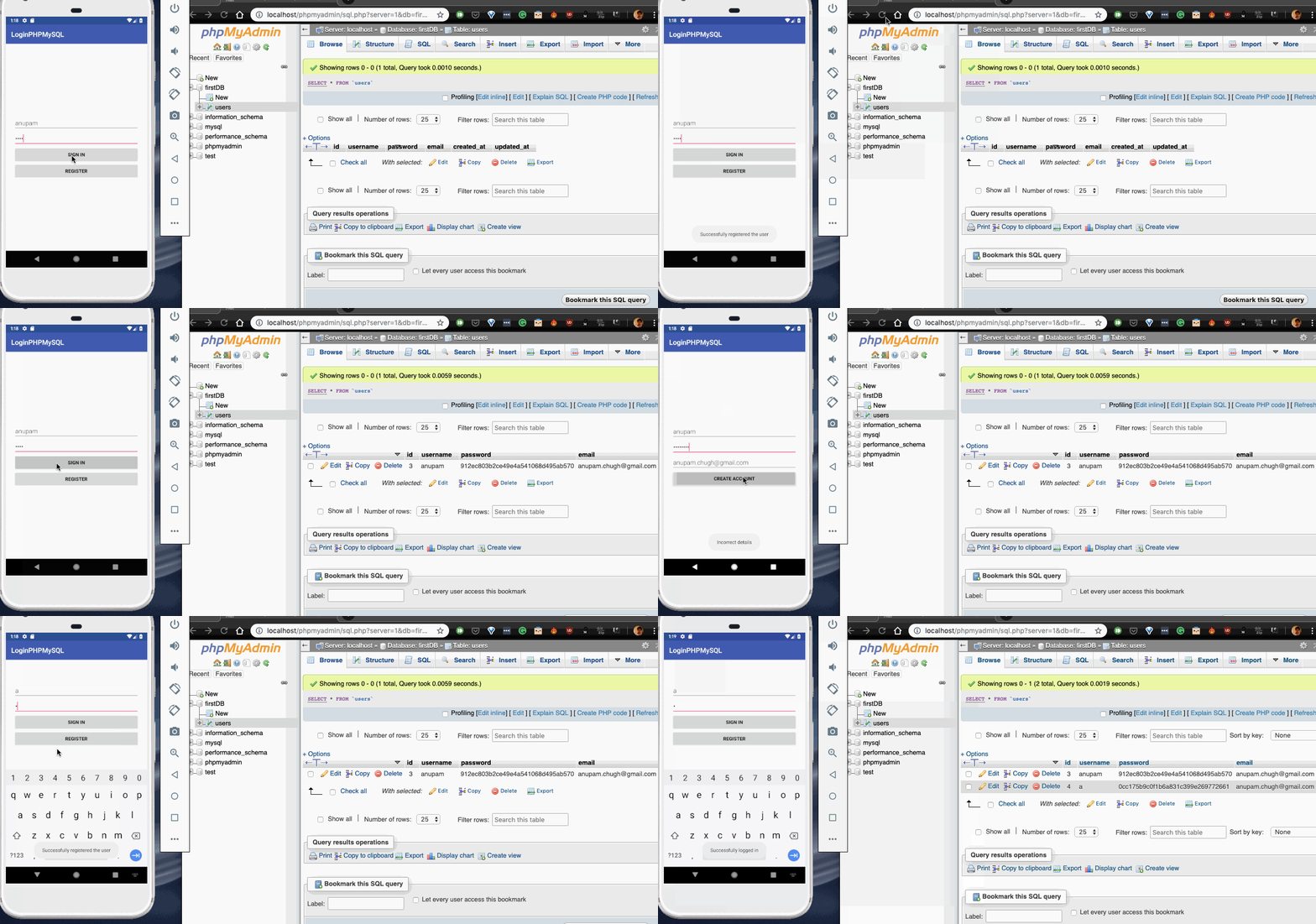
アプリケーションが動作している出力は以下の通りです。
Android登録ユーザー
下のスクリーンショットでは、新しいユーザーを登録し、それがデータベースに追加されます。その後、登録時に入力した資格情報を使用してログインします。
これでPHP MySQLを使用したAndroidログインチュートリアルは終了です。以下のリンクからプロジェクトをダウンロードできます。PHPファイルを含むtest_androidフォルダーも含まれています。それをxampp->htdocsフォルダーにコピーしてください!頑張ってください。
Androidログイン登録PHP MySQLプロジェクトをダウンロード
以下の私たちのGitHubリポジトリから、フルソースコードにもアクセスできます。
Githubプロジェクトリンク