OpenAI Gymの使い始め: カスタムジム環境の作成

OpenAI Gymには、クラシックな制御タスクを特徴とする環境から、エージェントをトレーニングしてブレークアウト、パックマン、シーQUESTなどのアタリゲームをプレイさせる環境まで、素晴らしい環境がたくさん詰まっています。しかし、Gymパッケージに含まれていないカスタム環境の作成が必要なタスクがあるかもしれません。幸いなことに、Gymはそれを可能にする柔軟性を備えており、まさにこの投稿のテーマです。
この記事では、障害物を避けながらチョッパー(またはヘリコプター)を飛ばすカスタム環境を設計します。これはOpen AI Gymシリーズの第二部であり、この記事を読むためには第一部で紹介された概念の知識が前提とされています。したがって、第一部をまだ読んでいない場合は、こちらがリンクです。
前提条件
- Python: このチュートリアルには、PythonがインストールされたマシンとPythonコーディングの初心者レベルの経験が推奨されます。
- Open AI Gym:このパッケージは使用されているマシン/ドロップレットにインストールする必要があります
依存関係/インポート
まず、いくつかの重要な依存関係をインストールすることから始めます。
!pip install opencv-python
!pip install pillow
私たちは必要なインポートから始めます。
import numpy as np
import cv2
import matplotlib.pyplot as plt
import PIL.Image as Image
import gym
import random

from gym import Env, spaces
import time

font = cv2.FONT_HERSHEY_COMPLEX_SMALL
環境の説明
私たちが作成している環境は、基本的に、インターネットから切断されているときにGoogle Chromeでプレイするダイナソーランゲームに強くインスパイアされたゲームです。恐竜が登場し、サボテンを飛び越え、鳥にぶつからないようにしなければなりません。進んだ距離は、最終的に得られる報酬を示しています。
私たちのゲームでは、恐竜の代わりに、私たちのエージェントはヘリコプターパイロットになります。
- ヘリコプターは最大の報酬を得るためにできるだけ多くの距離をカバーする必要があります。ヘリコプターが避けなければならない鳥がいます。
- エピソードは鳥の衝突の場合に終了します。また、ヘリコプターが燃料切れになった場合にもエピソードは終了することがあります。
- 鳥のように、ヘリコプターが集めてヘリコプターを満タンにするための浮遊式燃料タンク(そう、現実に近いことではありませんが、わかっています!)があります(容量は1000リットルに固定されています)。
これはあくまでコンセプトの証明に過ぎず、最も美的に pleasing なゲームではないことに注意してください。しかし、もし改善したい場合は、この記事がそれを行うのに十分な知識を提供するでしょう!
環境を設計する際の最初の考慮事項は、どのような観察空間と行動空間を使用するかを決定することです。
- 観測空間は連続的または離散的である可能性があります。離散的なアクション空間の例は、観測空間がセルによって定義され、エージェントがそのセルの1つの中にいるグリッドワールドです。連続的なアクション空間の例は、エージェントの位置が実数座標で表されるものです。
- アクションスペースは連続的でも離散的でもあり得ます。離散空間の例は、各アクションがエージェントの特定の行動に対応するが、その行動を定量化できないものです。これの例はマリオブラザーズで、各アクションは左に移動、右に移動、ジャンプなどにつながります。あなたの行動は生じる行動を定量化できません。つまり、ジャンプはできますが、高くジャンプするか、さらに高く、または低くはジャンプできません。しかし、アングリーバーズのようなゲームでは、スリングショットをどれだけ引き伸ばすかを決定します(それを定量化します)。
チョッパースケープクラス
私たちは、環境クラスであるChopperScapeの__init__関数を実装することから始めます。__init__関数では、観察空間と行動空間を定義します。それに加えて、いくつかの他の属性も実装します:
キャンバス: これは私たちの観察画像を表します。- x_min, y_min, x_max, y_max:これは、画面上のさまざまな要素、例えばチョッパーや鳥が配置される正当なエリアを定義します。他のエリアは、残りの燃料、報酬、パディングなどの情報を表示するために予約されています。
要素: これは、どの時点でも画面に保存されているアクティブな要素(チョッパー、鳥など)を保存します。max_fuel: ヘリコプターが保持できる最大燃料。
class ChopperScape(Env):
    def __init__(self):
        super(ChopperScape, self).__init__()


        # Define a 2-D observation space
        self.observation_shape = (600, 800, 3)
        self.observation_space = spaces.Box(low = np.zeros(self.observation_shape),
                                            high = np.ones(self.observation_shape),
                                            dtype = np.float16)


        # Define an action space ranging from 0 to 4
        self.action_space = spaces.Discrete(6,)

        # Create a canvas to render the environment images upon
        self.canvas = np.ones(self.observation_shape) * 1

        # Define elements present inside the environment
        self.elements = []

        # Maximum fuel chopper can take at once
        self.max_fuel = 1000

        # Permissible area of helicper to be
        self.y_min = int (self.observation_shape[0] * 0.1)
        self.x_min = 0
        self.y_max = int (self.observation_shape[0] * 0.9)
        self.x_max = self.observation_shape[1]
環境の要素
アクションスペースとオブザベーションスペースが決まったら、環境の要素を最終決定する必要があります。私たちのゲームでは、3つの異なる要素があります:チョッパー、飛ぶ鳥、そして浮遊する燃料ステーションです。これらすべてを、共通の基底クラスであるPointから継承する別々のクラスとして実装します。
ポイントベースクラス
Pointクラスは、私たちの観察画像上の任意の点を定義するために使用されます。このクラスは、次の属性を使って定義します。
(x,y): 画像上の点の位置。(x_min, x_max, y_min, y_max): 点の許容座標。これらの制限の外に点の位置を設定しようとすると、位置の値はこれらの制限にクリンチされます。name: ポイントの名前。
このクラスのために次のメンバ関数を定義します。
get_position: 点の座標を取得する。set_position: 点の座標を特定の値に設定します。移動: ポイントを特定の値だけ移動します。
class Point(object):
    def __init__(self, name, x_max, x_min, y_max, y_min):
        self.x = 0
        self.y = 0
        self.x_min = x_min
        self.x_max = x_max
        self.y_min = y_min
        self.y_max = y_max
        self.name = name

    def set_position(self, x, y):
        self.x = self.clamp(x, self.x_min, self.x_max - self.icon_w)
        self.y = self.clamp(y, self.y_min, self.y_max - self.icon_h)

    def get_position(self):
        return (self.x, self.y)

    def move(self, del_x, del_y):
        self.x += del_x
        self.y += del_y

        self.x = self.clamp(self.x, self.x_min, self.x_max - self.icon_w)
        self.y = self.clamp(self.y, self.y_min, self.y_max - self.icon_h)

    def clamp(self, n, minn, maxn):
        return max(min(maxn, n), minn)
ここで、クラス Chopper、Bird、および Fuel を定義します。これらのクラスは Point クラスから派生しており、一連の新しい属性を導入します:
アイコン: ゲームがレンダリングされたときに観察画像に表示されるポイントのアイコン。(アイコンの幅, アイコンの高さ): アイコンの寸法。
class Chopper(Point):
    def __init__(self, name, x_max, x_min, y_max, y_min):
        super(Chopper, self).__init__(name, x_max, x_min, y_max, y_min)
        self.icon = cv2.imread("chopper.png") / 255.0
        self.icon_w = 64
        self.icon_h = 64
        self.icon = cv2.resize(self.icon, (self.icon_h, self.icon_w))


class Bird(Point):
    def __init__(self, name, x_max, x_min, y_max, y_min):
        super(Bird, self).__init__(name, x_max, x_min, y_max, y_min)
        self.icon = cv2.imread("bird.png") / 255.0
        self.icon_w = 32
        self.icon_h = 32
        self.icon = cv2.resize(self.icon, (self.icon_h, self.icon_w))

class Fuel(Point):
    def __init__(self, name, x_max, x_min, y_max, y_min):
        super(Fuel, self).__init__(name, x_max, x_min, y_max, y_min)
        self.icon = cv2.imread("fuel.png") / 255.0
        self.icon_w = 32
        self.icon_h = 32
        self.icon = cv2.resize(self.icon, (self.icon_h, self.icon_w))
チョッパースケープ クラスに戻る
第1部を思い出してください。任意のジム Env クラスには、2つの重要な関数があります:
- リセット: 環境を初期状態にリセットし、初期観測を返します。
- 環境内でアクションを適用してステップを実行します。新しい観察結果、報酬、完了状態、その他の情報を返します。
このセクションでは、私たちの環境のreset関数とstep関数、そして多くの補助関数を実装します。まずreset関数から始めます。
リセット機能
環境をリセットする際には、環境内のすべての状態に基づく変数をリセットする必要があります。これには、消費された燃料、エピソードごとのリターン、環境内に存在する要素などが含まれます。
私たちの場合、環境をリセットするとき、初期状態にはチョッパーしかありません。チョッパーは画像の左上のエリアでランダムに初期化します。このエリアは画像の幅の5-10パーセント、高さの15-20パーセントです。
私たちはまた、draw_elements_on_canvasというヘルパー関数を定義します。この関数は、ゲーム内に存在する各要素のアイコンを観察画像上のそれぞれの位置に配置するものです。もし位置が許容範囲を超える場合、そのアイコンは範囲の境界に配置されます。また、残りの燃料などの重要な情報も表示します。
私たちはついに要素が配置されたキャンバスを観察として返します。
%%add_to ChopperScape

def draw_elements_on_canvas(self):
    # Init the canvas
    self.canvas = np.ones(self.observation_shape) * 1

    # Draw the heliopter on canvas
    for elem in self.elements:
        elem_shape = elem.icon.shape
        x,y = elem.x, elem.y
        self.canvas[y : y + elem_shape[1], x:x + elem_shape[0]] = elem.icon

    text = 'Fuel Left: {} | Rewards: {}'.format(self.fuel_left, self.ep_return)

    # Put the info on canvas
    self.canvas = cv2.putText(self.canvas, text, (10,20), font,
               0.8, (0,0,0), 1, cv2.LINE_AA)

def reset(self):
    # Reset the fuel consumed
    self.fuel_left = self.max_fuel

    # Reset the reward
    self.ep_return  = 0

    # Number of birds
    self.bird_count = 0
    self.fuel_count = 0

    # Determine a place to intialise the chopper in
    x = random.randrange(int(self.observation_shape[0] * 0.05), int(self.observation_shape[0] * 0.10))
    y = random.randrange(int(self.observation_shape[1] * 0.15), int(self.observation_shape[1] * 0.20))

    # Intialise the chopper
    self.chopper = Chopper("chopper", self.x_max, self.x_min, self.y_max, self.y_min)
    self.chopper.set_position(x,y)

    # Intialise the elements
    self.elements = [self.chopper]

    # Reset the Canvas
    self.canvas = np.ones(self.observation_shape) * 1

    # Draw elements on the canvas
    self.draw_elements_on_canvas()


    # return the observation
    return self.canvas
進む前に、最初の観察がどのようなものかを見てみましょう。
env = ChopperScape()
obs = env.reset()
plt.imshow(obs)

私たちの観察がゲームのゲームプレイ画面と同じであるため、レンダリング機能も私たちの観察を返す必要があります。私たちは、ポップアップウィンドウでゲームを表示するhumanモードと、ピクセル配列として返すrgb_arrayモードの2つのモードの機能を構築します。
%%add_to ChopperScape

def render(self, mode = "human"):
    assert mode in ["human", "rgb_array"], "Invalid mode, must be either \"human\" or \"rgb_array\""
    if mode == "human":
        cv2.imshow("Game", self.canvas)
        cv2.waitKey(10)

    elif mode == "rgb_array":
        return self.canvas

def close(self):
    cv2.destroyAllWindows()

env = ChopperScape()
obs = env.reset()
screen = env.render(mode = "rgb_array")
plt.imshow(screen)

ステップ関数
私たちがreset関数を片付けたので、次の状態に遷移するためのアクションに応じて環境を移行させるコードを含むstep関数の実装作業を始めます。このセクションは、私たちの環境の比喩的な核心部分であり、ここで最も多くの計画が行われます。
まず、環境の一つの遷移段階で必要なことを列挙する必要があります。これは基本的に二つの部分に分けることができます:
- 私たちのエージェントにアクションを適用する。
- 環境で起こるその他すべてのこと、例えば非強化学習(RL)アクター(例:鳥や浮遊するガソリンスタンド)の行動など。
まずは(1)に焦点を当てましょう。私たちは、ヘリコプターの動きを制御するためのアクションをゲームに提供します。基本的に、右に移動、左に移動、下に移動、上に移動、または何もしないという5つのアクションがあります。それぞれ0、1、2、3、4で示されています。
私たちは、各アクションがどの整数にマッピングされているかを教えてくれるメンバー関数get_action_meanings()を定義します。
%%add_to ChopperScape

def get_action_meanings(self):
    return {0: "Right", 1: "Left", 2: "Down", 3: "Up", 4: "Do Nothing"}
私たちは、渡されるアクションがアクションスペースに存在するかどうかを確認することで、そのアクションが有効であるかどうかを検証します。存在しない場合は、アサーションを発生させます。
Assert that it is a valid action
assert self.action_space.contains(action), "Invalid Action"
それが完了したら、先に定義したmove関数を使用して、チョッパーの位置を適切に変更します。各アクションは、それぞれの方向に5座標の移動をもたらします。
apply the action to the chopper
if action == 0:
    self.chopper.move(0,5)
elif action == 1:
    self.chopper.move(0,-5)
elif action == 2:
    self.chopper.move(5,0)
elif action == 3:
    self.chopper.move(-5,0)
elif action == 4:
    self.chopper.move(0,0)
アクションをヘリコプターに適用することができたので、環境の他の要素に焦点を当てます:
- 画面の右端から1%の確率で鳥がランダムに出現します(つまり、100フレームごとに1回、右端に鳥が現れる可能性があります)。鳥は毎フレーム5座標ポイント左に移動します。もしチョッパーにぶつかるとゲームが終了します。それ以外の場合、左端に到達するとゲームから消えます。
- 燃料タンクは画面の下端からランダムに出現し、その確率は1%です(つまり、燃料タンクは100フレームに1回、下端に現れる可能性があります)。鳥は毎フレーム5座標上に移動します。もし彼らがヘリコプターに当たると、ヘリコプターは満タンになります。そうでなければ、彼らは上端に達するとゲームから消えてしまいます。
上記の機能を実装するためには、2つのPointオブジェクト(例えば、チョッパー/鳥、チョッパー/燃料タンク)が衝突しているかどうかを判断するヘルパー関数を実装する必要があります。衝突をどのように定義しますか?私たちは、2つの点の中心の座標間の距離がその寸法の合計の半分よりも小さいときに衝突していると言います。この関数をhas_collidedと呼びます。
%%add_to ChopperScape

def has_collided(self, elem1, elem2):
    x_col = False
    y_col = False

    elem1_x, elem1_y = elem1.get_position()
    elem2_x, elem2_y = elem2.get_position()

    if 2 * abs(elem1_x - elem2_x) <= (elem1.icon_w + elem2.icon_w):
        x_col = True

    if 2 * abs(elem1_y - elem2_y) <= (elem1.icon_h + elem2.icon_h):
        y_col = True

    if x_col and y_col:
        return True

    return False
これとは別に、帳簿記入を行う必要があります。各ステップの報酬は1なので、エピソードごとにエピソードのリターンカウンターは1ずつ更新されます。衝突が発生した場合、報酬は-10となり、エピソードは終了します。燃料カウンターは、各ステップで1ずつ減少します。
ついに、私たちはstep関数を実装します。あなたがそれを理解できるように、詳細なコメントを書きました。
%%add_to ChopperScape

def step(self, action):
    # Flag that marks the termination of an episode
    done = False

    # Assert that it is a valid action
    assert self.action_space.contains(action), "Invalid Action"

    # Decrease the fuel counter
    self.fuel_left -= 1

    # Reward for executing a step.
    reward = 1

    # apply the action to the chopper
    if action == 0:
        self.chopper.move(0,5)
    elif action == 1:
        self.chopper.move(0,-5)
    elif action == 2:
        self.chopper.move(5,0)
    elif action == 3:
        self.chopper.move(-5,0)
    elif action == 4:
        self.chopper.move(0,0)

    # Spawn a bird at the right edge with prob 0.01
    if random.random() < 0.01:

        # Spawn a bird
        spawned_bird = Bird("bird_{}".format(self.bird_count), self.x_max, self.x_min, self.y_max, self.y_min)
        self.bird_count += 1

        # Compute the x,y co-ordinates of the position from where the bird has to be spawned
        # Horizontally, the position is on the right edge and vertically, the height is randomly
        # sampled from the set of permissible values
        bird_x = self.x_max
        bird_y = random.randrange(self.y_min, self.y_max)
        spawned_bird.set_position(self.x_max, bird_y)

        # Append the spawned bird to the elements currently present in Env.
        self.elements.append(spawned_bird)

    # Spawn a fuel at the bottom edge with prob 0.01
    if random.random() < 0.01:
        # Spawn a fuel tank
        spawned_fuel = Fuel("fuel_{}".format(self.bird_count), self.x_max, self.x_min, self.y_max, self.y_min)
        self.fuel_count += 1

        # Compute the x,y co-ordinates of the position from where the fuel tank has to be spawned
        # Horizontally, the position is randomly chosen from the list of permissible values and
        # vertically, the position is on the bottom edge
        fuel_x = random.randrange(self.x_min, self.x_max)
        fuel_y = self.y_max
        spawned_fuel.set_position(fuel_x, fuel_y)

        # Append the spawned fuel tank to the elemetns currently present in the Env.
        self.elements.append(spawned_fuel)

    # For elements in the Ev
    for elem in self.elements:
        if isinstance(elem, Bird):
            # If the bird has reached the left edge, remove it from the Env
            if elem.get_position()[0] <= self.x_min:
                self.elements.remove(elem)
            else:
                # Move the bird left by 5 pts.
                elem.move(-5,0)

            # If the bird has collided.
            if self.has_collided(self.chopper, elem):
                # Conclude the episode and remove the chopper from the Env.
                done = True
                reward = -10
                self.elements.remove(self.chopper)

        if isinstance(elem, Fuel):
            # If the fuel tank has reached the top, remove it from the Env
            if elem.get_position()[1] <= self.y_min:
                self.elements.remove(elem)
            else:
                # Move the Tank up by 5 pts.
                elem.move(0, -5)

            # If the fuel tank has collided with the chopper.
            if self.has_collided(self.chopper, elem):
                # Remove the fuel tank from the env.
                self.elements.remove(elem)

                # Fill the fuel tank of the chopper to full.
                self.fuel_left = self.max_fuel

    # Increment the episodic return
    self.ep_return += 1

    # Draw elements on the canvas
    self.draw_elements_on_canvas()

    # If out of fuel, end the episode.
    if self.fuel_left == 0:
        done = True

    return self.canvas, reward, done, []
それを実際に見る
これで私たちの環境のコードは完了です。次に、ランダムな行動を取るエージェントを使用して環境内でいくつかのステップを実行してください!
from IPython import display

env = ChopperScape()
obs = env.reset()


while True:
    # Take a random action
    action = env.action_space.sample()
    obs, reward, done, info = env.step(action)

    # Render the game
    env.render()

    if done == True:
        break

env.close()
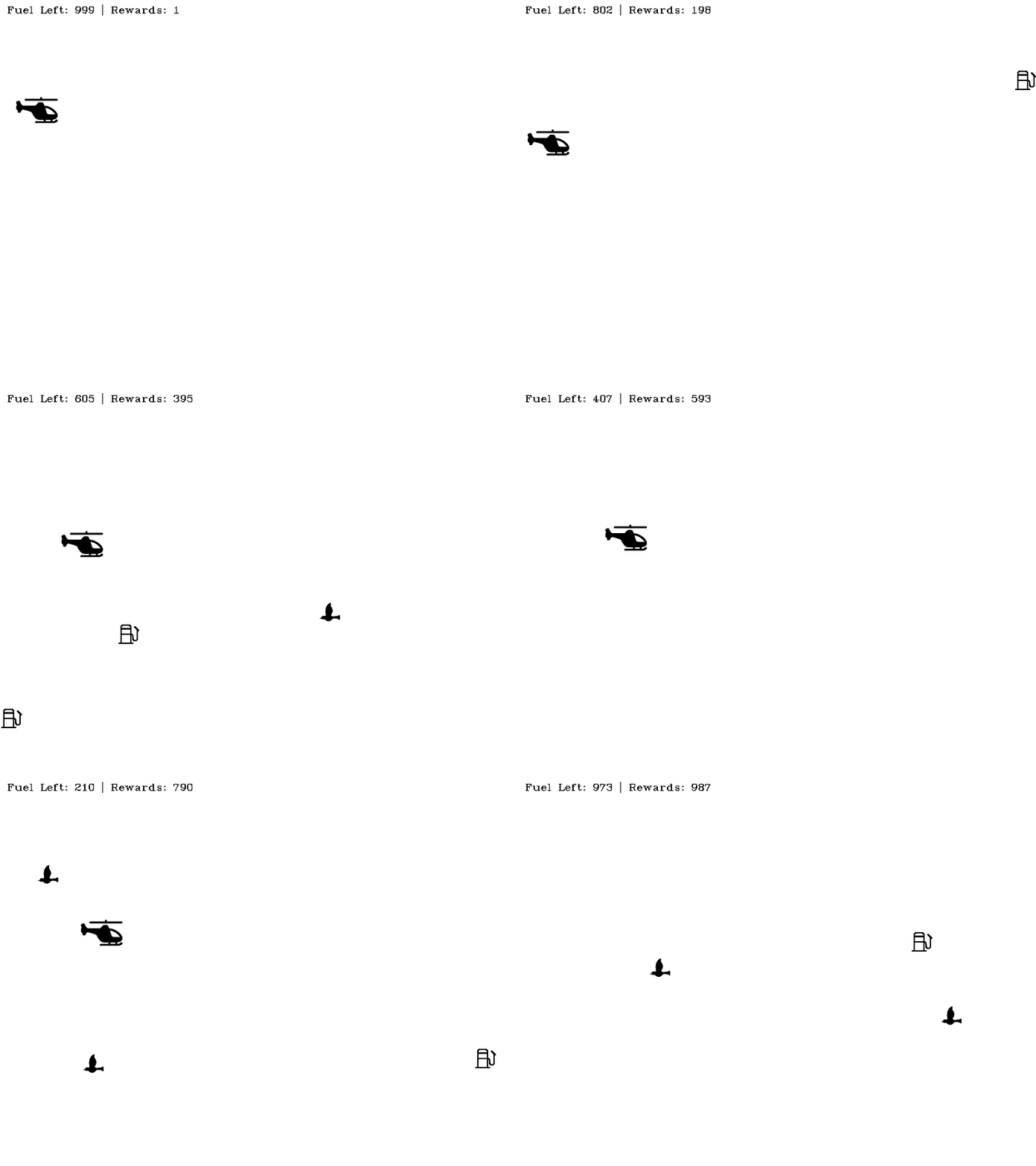
環境を表現する
結論
このパートはこれで終わりです、皆さん。このチュートリアルがカスタムOpenAI環境をデザインする際の考慮事項や設計上の決定についての洞察を与えることができたことを願っています。あなたは今、好きな環境を作成することができるし、もし興味があれば、私たちがデザインしたものにいくつかの改善を加えることもできます。いくつかの提案をすぐに挙げると:
- 最初の鳥の衝突でエピソードが終了するのではなく、ヘリコプターに複数のライフを実装することができます。
- ミサイルをヘリコプターに発射できる変異した鳥の悪のエイリアン種族をデザインし、ヘリコプターはそれを避けなければならない。
- 燃料タンクと鳥が衝突したときの対処をしてください!
これらの提案で、完了です。楽しいコーディングを!