AWSでSQSキューを作成するためにCloudFormationを使用する方法
AWSでSQSキューを作成するためにCloudFormationを使用する方法
このページで
- 前提条件
- 私たちは何をしますか?
- CloudFormationスタックを使用してスタンダードキューを作成する
- CloudFormationスタックを使用してFIFOキューを作成する
- 結論
AWS Simple Queue Service (SQS) は、マイクロサービス、サーバーレスアプリケーション、分散システムを分離してスケーリングすることを可能にする完全管理型メッセージキューイングサービスです。 SQSを使用すると、ソフトウェアコンポーネント間でメッセージを送信、保存、受信することができ、メッセージを失うことはありません。AWS SQS は、スタンダードキューと FIFO キューの 2 種類のメッセージキューを提供しています。 SQS キューについて詳細を理解するには、「AWS で SQS キューを作成する方法?」という記事を検索してください。
AWS CloudFormationは、プログラミング言語(yaml/json)またはシンプルなテキストファイルを使用して、アプリケーションに必要なすべてのリソースをモデリングおよびプロビジョニングすることを可能にします。これにより、AWSリソースの単一の真実のソースが得られます。
この記事では、Cloudformationスタックを使用して標準キューとFIFOキューを作成する手順を見ていきます。
前提条件
私たちは何をしますか?
AWSにログイン
リンクをクリックすると、ログイン情報を使用してログインする必要がある以下のようなウェブページが表示されます。

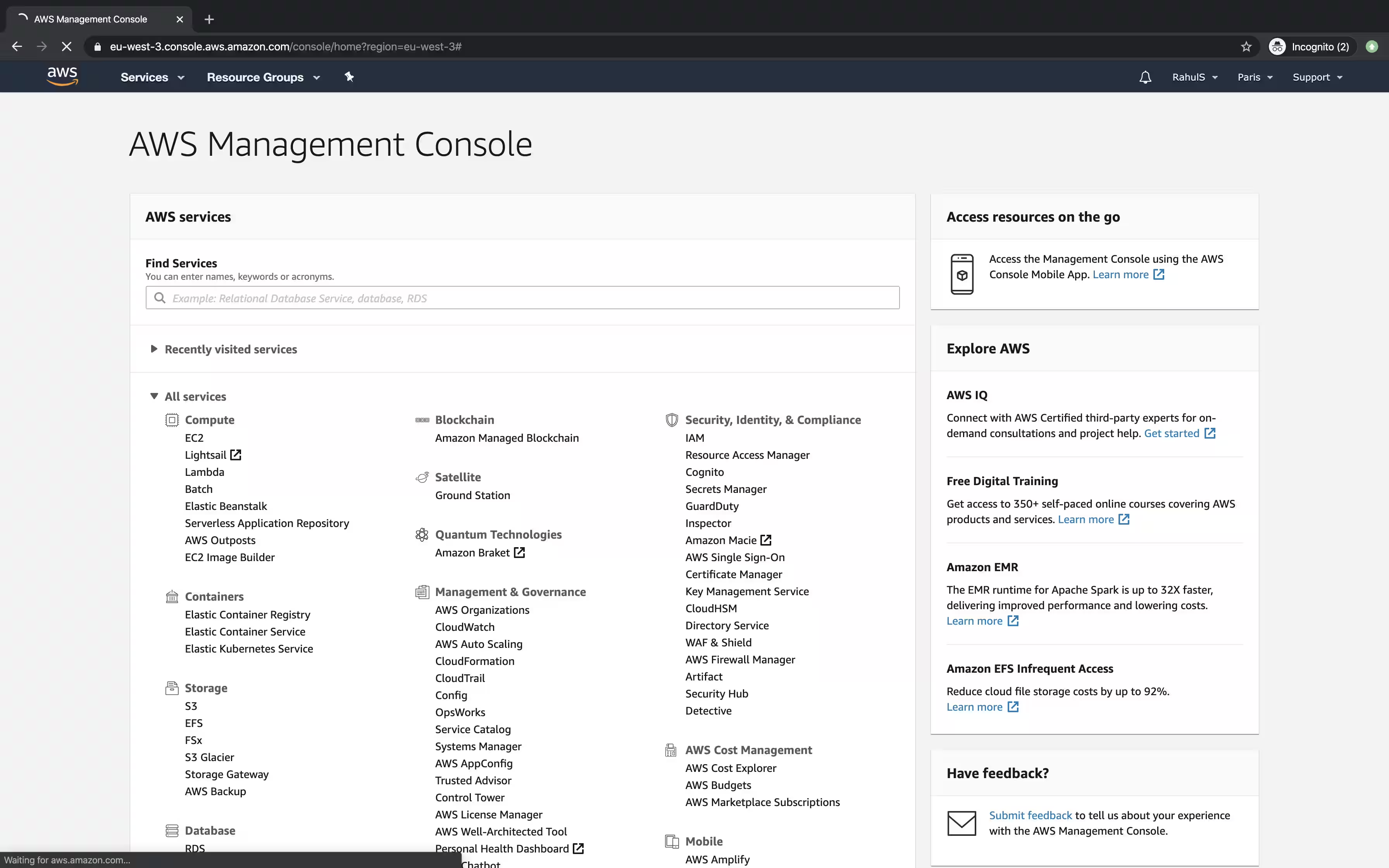
AWSに無事ログインすると、すべてのサービスが一覧表示されたメインコンソールが表示されます。
CloudFormationスタックを使用してスタンダードキューを作成する
標準キューを作成する前に、以下のブロックからコードをコピーするか、こちらからテンプレートをダウンロードして、ローカルマシンに保存してください。このテンプレートは、Cloudformationスタックを作成するときに必要です。
---
AWSTemplateFormatVersion: '2010-09-09'
Description: This stack creates a Standard Queue
Parameters:
  DelaySeconds:
    Description: "The time in seconds that the delivery of all messages in the queue is delayed"
    Type: Number
    Default: '5'
  MaximumMessageSize:
    Type: Number
    Description: "The limit of how many bytes that a message can contain before Amazon SQS rejects it"
    Default: '262144'
  MessageRetentionPeriod:
    Description: "The number of seconds that Amazon SQS retains a message."
    Type: Number
    Default: '345600'
  ReceiveMessageWaitTimeSeconds:
    Description: "Specifies the duration, in seconds, that the ReceiveMessage action call waits until a message is in the queue in order to include it in the response"
    Type: Number
    Default: '0'
  UsedeadletterQueue:
    Description: "A dead-letter queue is a queue that other (source) queues can target for messages that can't be processed (consumed) successfully."
    Type: String
    AllowedValues:
    - 'true'
    - 'false'
    Default: 'false'
  VisibilityTimeout:
    Description: "This should be longer than the time it would take to process and delete a message"
    Type: Number
    Default: '5'
Mappings: {}
Conditions:
  CreateDeadLetterQueue:
    Fn::Equals:
    - Ref: UsedeadletterQueue
    - 'true'
Resources:
  SQSQueue:
    Type: AWS::SQS::Queue
    Properties:
      DelaySeconds:
        Ref: DelaySeconds
      MaximumMessageSize:
        Ref: MaximumMessageSize
      MessageRetentionPeriod:
        Ref: MessageRetentionPeriod
      ReceiveMessageWaitTimeSeconds:
        Ref: ReceiveMessageWaitTimeSeconds
      RedrivePolicy:
        Fn::If:
        - CreateDeadLetterQueue
        - deadLetterTargetArn:
            Fn::GetAtt:
            - MyDeadLetterQueue
            - Arn
          maxReceiveCount: 5
        - Ref: AWS::NoValue
      VisibilityTimeout:
        Ref: VisibilityTimeout
  MyDeadLetterQueue:
    Condition: CreateDeadLetterQueue
    Type: AWS::SQS::Queue
Outputs:
  QueueURL:
    Description: URL of the created SQS
    Value:
      Ref: SQSQueue
  QueueARN:
    Description: ARN of the created SQS
    Value:
      Fn::GetAtt:
      - SQSQueue
      - Arn
  QueueName:
    Description: Name of the created SQS
    Value:
      Fn::GetAtt:
      - SQSQueue
      - QueueName
  DeadLetterQueueURL:
    Condition: CreateDeadLetterQueue
    Description: URL of the dead letter queue
    Value:
      Ref: MyDeadLetterQueue
  DeadLetterQueueARN:
    Condition: CreateDeadLetterQueue
    Description: ARN of the dead letter queue
    Value:
      Fn::GetAtt:
      - MyDeadLetterQueue
      - Arn
CloudFormationスタックを使用して標準キューを作成するには、上部のメニューバーから「サービス」をクリックし、「CloudFormation」を検索してください。

CloudFormationのメインダッシュボードで、「スタックを作成」をクリックしてスタックを作成します。

ローカルマシンからテンプレートをアップロードするには、「テンプレートファイルをアップロード」ラジオボタンをクリックし、「次へ」をクリックしてください。

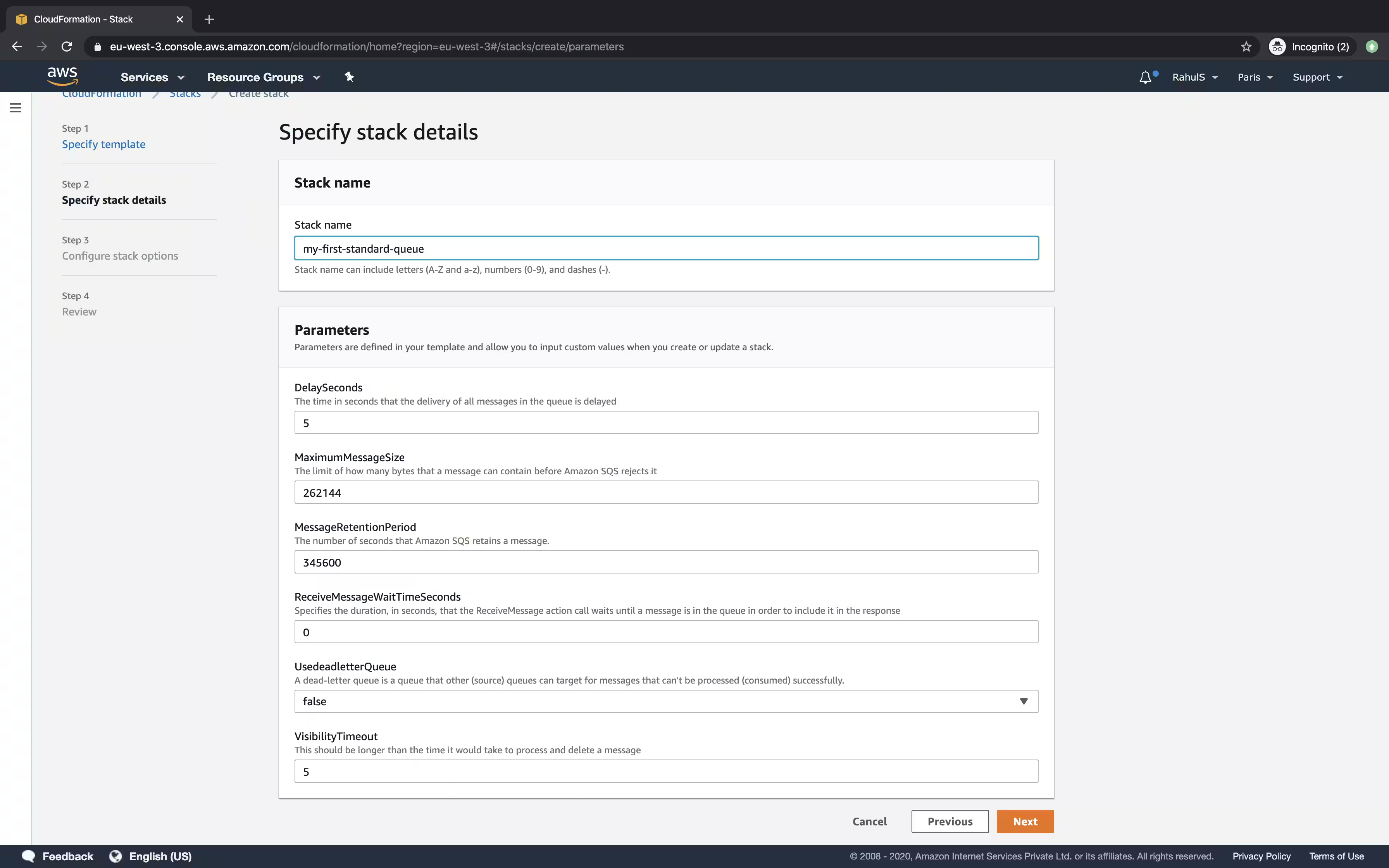
作成するスタックに名前を指定し、必要な詳細を入力するか、デフォルト値で進んで「次へ」をクリックしてください。
SQSの作成時に適用できるタグを指定し、「次へ」をクリックしてください。

ページを下にスクロールして「スタックを作成」ボタンをクリックすると、標準キューを作成するためのスタックが作成されます。

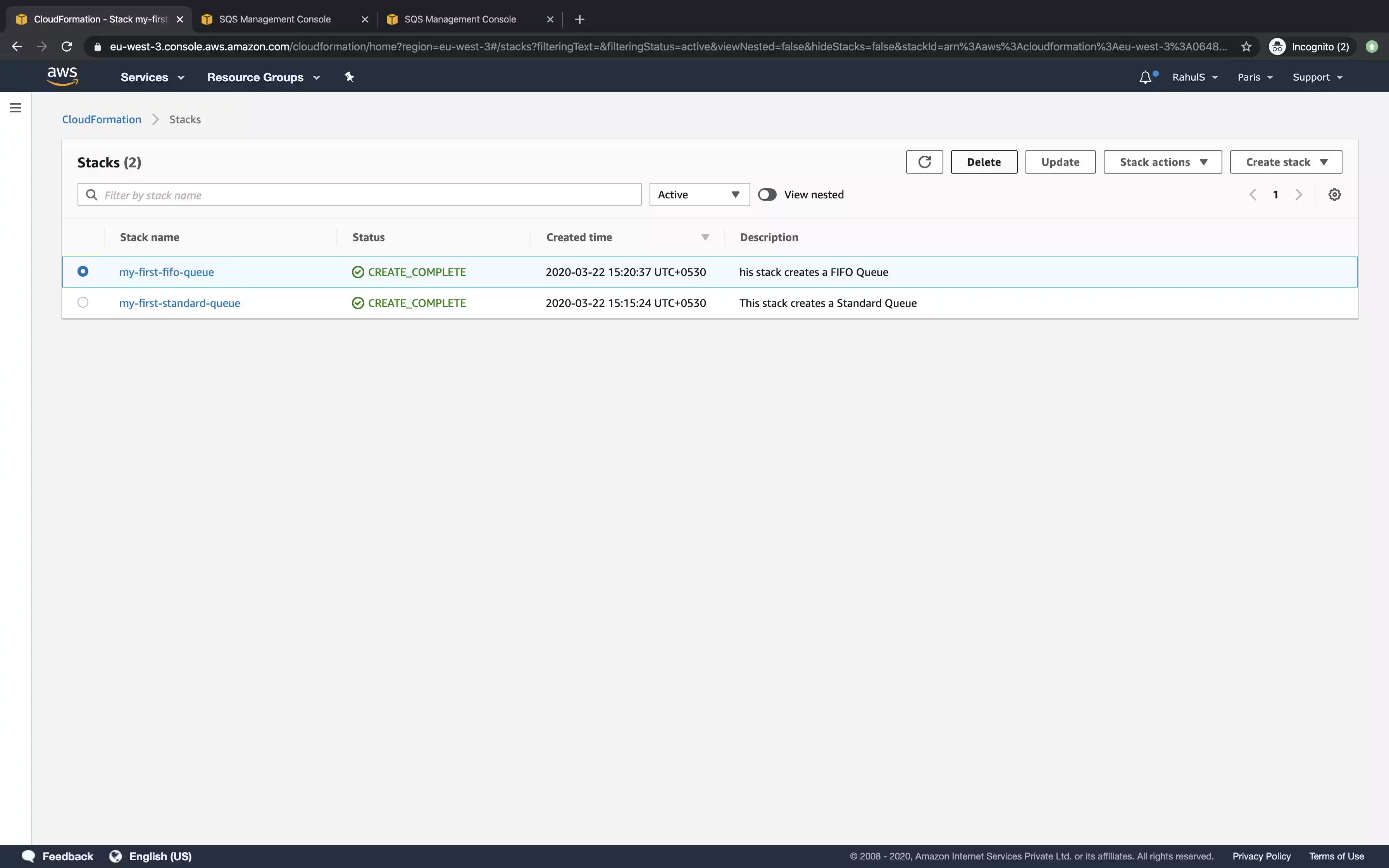
イベントの下にステータスを見ることができます。スタックのステータスが「CREATE_COMPLETE」に変わると、キューが作成されたことを意味します。

「サービス」をクリックし、「SQS」を検索して、キューが作成されたかどうかを確認してください。

SQSのメインダッシュボードでは、キューが作成されており、キューの名前はクラウドフォーメーションスタック名にランダムなサフィックス文字列が付けられています。これは、スタックでキュー名を指定しなかったためです。

CloudFormationスタックを使用してFIFOキューを作成する
FIFOキューを作成する前に、次のブロックからコードをコピーするか、ここからテンプレートをダウンロードして、ローカルシステムに保存してください。
---
AWSTemplateFormatVersion: '2010-09-09'
Description: This stack creates a FIFO Queue
Parameters:
  ContentBasedDeduplication:
    Description: Specifie whether to enable content-based deduplication
    Type: String
    AllowedValues:
    - 'true'
    - 'false'
    Default: 'true'
  QueueName:
    Description: This stack will append .fifo to the end of the Queue name.
    Type: String
  DelaySeconds:
    Description: "The time in seconds that the delivery of all messages in the queue"
    Type: Number
    Default: '5'
  MaximumMessageSize:
    Type: Number
    Description: "The limit of how many bytes that a message can contain before Amazon"
    Default: '262144'
  MessageRetentionPeriod:
    Description: "The number of seconds that Amazon SQS retains a message."
    Type: Number
    Default: '345600'
  ReceiveMessageWaitTimeSeconds:
    Description: "Specifies the duration, in seconds, that the ReceiveMessage action
      call waits until a message is in the queue in order to include it in the response"
    Type: Number
    Default: '0'
  UsedeadletterQueue:
    Description: "A dead-letter queue is a queue that other (source) queues can target
      for messages that can't be processed (consumed) successfully."
    Type: String
    AllowedValues:
    - 'true'
    - 'false'
    Default: 'false'
  VisibilityTimeout:
    Description: "This should be longer than the time it would take to process and
      delete a message"
    Type: Number
    Default: '5'
Mappings: {}
Conditions:
  CreateDeadLetterQueue:
    Fn::Equals:
    - Ref: UsedeadletterQueue
    - 'true'
Resources:
  SQSQueue:
    Type: AWS::SQS::Queue
    Properties:
      ContentBasedDeduplication:
        Ref: ContentBasedDeduplication
      FifoQueue: 'true'
      QueueName:
        Fn::Join:
        - ''
        - - Ref: QueueName
          - ".fifo"
      MaximumMessageSize:
        Ref: MaximumMessageSize
      MessageRetentionPeriod:
        Ref: MessageRetentionPeriod
      ReceiveMessageWaitTimeSeconds:
        Ref: ReceiveMessageWaitTimeSeconds
      RedrivePolicy:
        Fn::If:
        - CreateDeadLetterQueue
        - deadLetterTargetArn:
            Fn::GetAtt:
            - MyDeadLetterQueue
            - Arn
          maxReceiveCount: 5
        - Ref: AWS::NoValue
      VisibilityTimeout:
        Ref: VisibilityTimeout
  MyDeadLetterQueue:
    Condition: CreateDeadLetterQueue
    Type: AWS::SQS::Queue
    Properties:
      FifoQueue: 'true'
      QueueName:
        Fn::Join:
        - ''
        - - Ref: QueueName
          - Deadletter
          - ".fifo"
Outputs:
  QueueURL:
    Description: URL of the created SQS
    Value:
      Ref: SQSQueue
  QueueARN:
    Description: ARN of the created SQS
    Value:
      Fn::GetAtt:
      - SQSQueue
      - Arn
  QueueName:
    Description: Name of the created SQS
    Value:
      Fn::GetAtt:
      - SQSQueue
      - QueueName
CloudFormationのメインダッシュボードに戻り、標準キューを作成するために従ったのと同じ手順に従ってください。

スタックが作成されると、FIFOキューが使用可能であることがわかります。ここで、FIFOキューにランダムな文字列がないことがわかります。その理由は、Cloudformationテンプレートにキューの名前を指定できるオプションがあるからです。

キューがもう必要ない場合は、メインダッシュボードからCloudFormationスタックを削除することで削除できます。
結論
この記事では、CloudFormationスタックを使用して標準キューとFIFOキューを作成する手順を見ました。